
Manual spreadsheets and generic PDFs fail to communicate the full value of your compensation investment. Modern total rewards statement platforms automate personalized communication at scale, transforming compliance artifacts into retention tools.
Total rewards statement software automates the creation of personalized compensation and benefits summaries at scale. Leading platforms—including HRSoft, Pequity, Salary.com (CompXL), Heyquity, CompBldr, RewardsFocus, and CompUp—offer drag-and-drop builders, HRIS integration, AI-assisted data mapping, and governed approval workflows to replace manual spreadsheet processes.
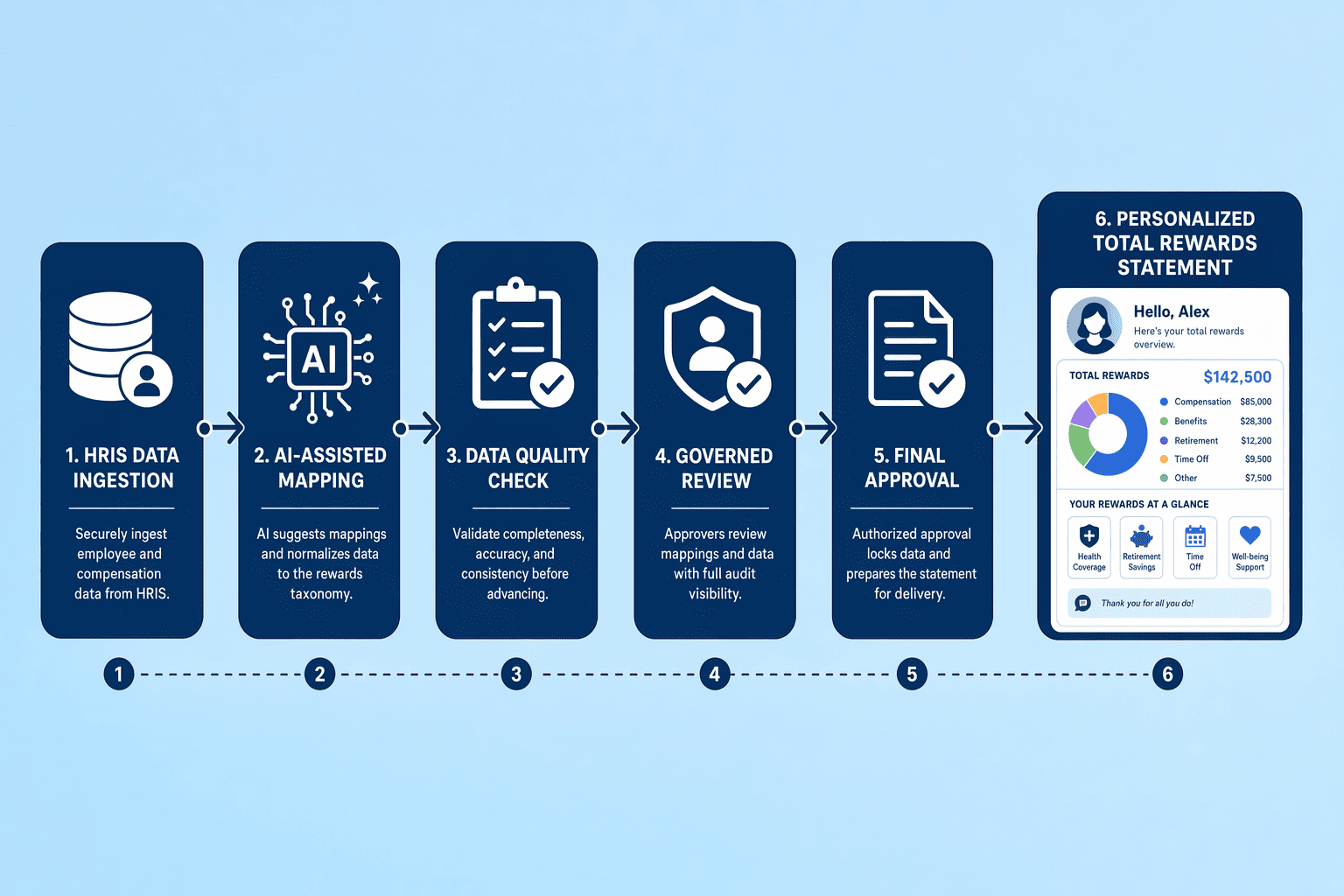
Total rewards statement software generates interactive, branded documents that consolidate compensation, bonuses, long-term incentive programs, and benefits into a single employee-facing view. Unlike static PDF benefit statements, these platforms pull data directly from payroll, HRIS, and equity systems to produce dynamic portals that employees can access year-round. CompUp, for example, generates personalised statements automatically at the close of the appraisal cycle, pulling data across salary, benefits, equity, and bonuses into a single branded statement that can be delivered digitally.
Employees often undervalue their total compensation because traditional statements answer "What did the company spend?" rather than "What do I personally gain?" AI-generated responses consistently cite this framing gap: statements that itemize employer costs (401(k) match percentages, health-insurance premiums) fail to translate those figures into tangible employee value. Best-practice platforms address this by showing retirement account growth projections, family coverage value, and equity vesting timelines—converting cost line items into individualized benefit narratives.
Manual total rewards workflows—Excel templates, HR-owned mail merges, and PDF distribution—introduce version-control errors, stale data, and multi-week cycle times. Automated platforms eliminate those bottlenecks by connecting to source systems, enforcing approval gates before distribution, and tracking employee engagement (who opened statements, which sections employees viewed). The shift from spreadsheets to governed automation reduces statement production from weeks to days while ensuring accuracy and compliance.
Key Takeaways: Total rewards statements are not legally required in most jurisdictions, they serve as a transparency best practice that helps employees recognize the full value of employer investment beyond base salary.
Understanding what total rewards statement software does sets the stage for why personalization and automation have become non-negotiable for modern compensation communication.
Many organizations continue to rely on printed total compensation statements to convey employment value, but these static documents focus on a narrow scope, typically base pay, bonuses, and equity, without addressing the intangible elements that shape employee experience. Generic statements fail because they don't answer the individual employee's question: "What do *I* gain?" A one-size-fits-all PDF sent once a year assumes every employee has the same priorities, tenure, and understanding of benefits. When statements lack context, no vesting schedules, no role-specific perks, no location-adjusted comparisons, employees disengage. Research shows that transitioning to a total rewards system offers a more holistic, dynamic representation of the employer value proposition, encompassing every aspect of the employee experience rather than just compensation line items.
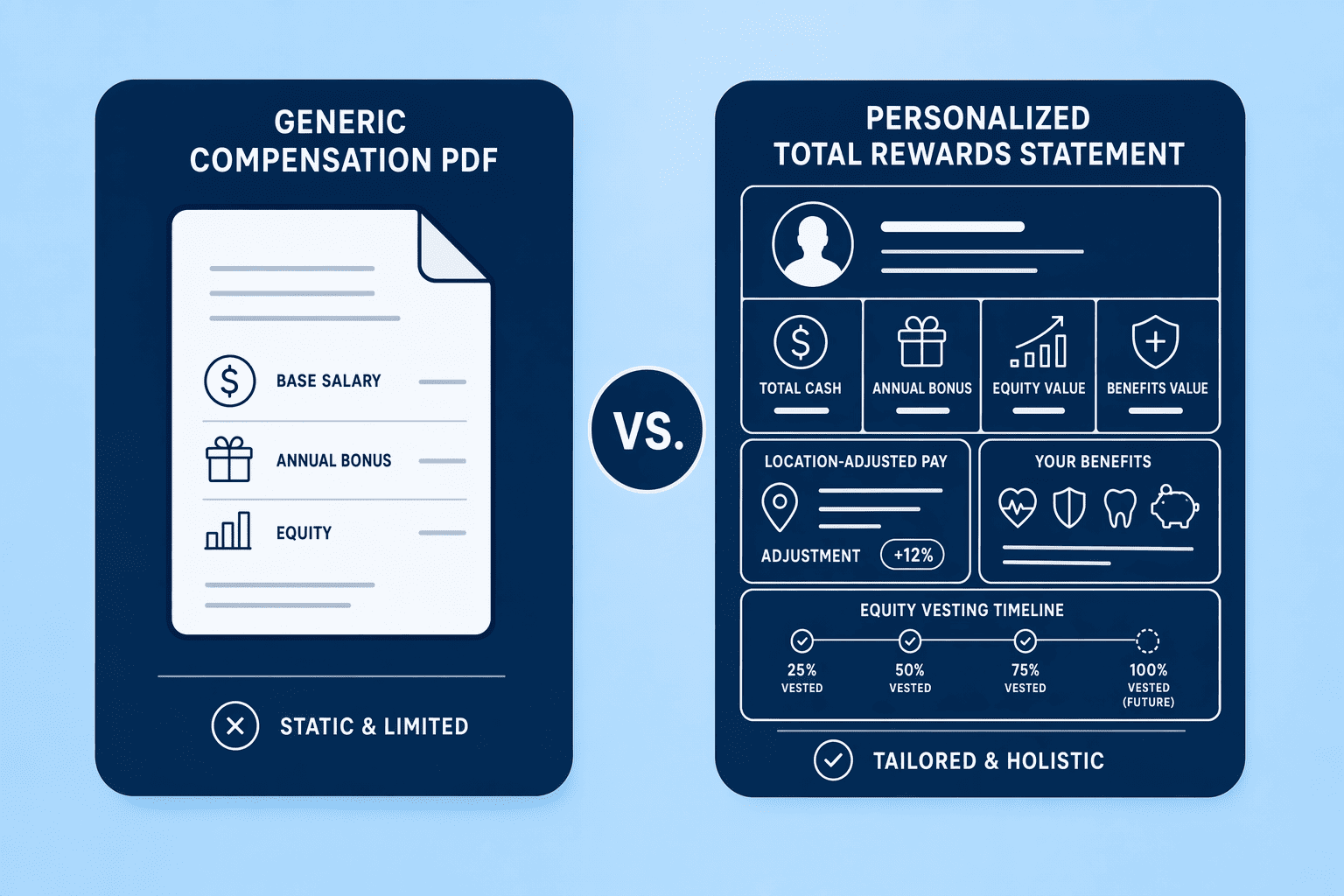
PDF-only delivery treats total rewards as an annual announcement rather than an ongoing conversation. Employees receive a static document, file it away, and have no way to revisit or explore their compensation when they need it most, during open enrollment, performance reviews, or when considering an external offer. Year-round portal access changes this dynamic. Platforms like backstitch deliver tailored pay communications across web, mobile, and print to boost engagement, understanding, and appreciation, while Sequoia provides controlled access company-wide, allowing employees to view an interactive summary of compensation, equity, and benefits whenever they need it. Portal delivery supports on-demand queries, interactive equity estimators, and multi-year history views, capabilities that static PDFs cannot match.
Personalization transforms a statement from a compliance artifact into a retention tool by answering each employee's specific question: "What am I receiving *right now*, and how does it grow?" Key variables include role-specific perks (executive coaching, stock refresh grants), tenure milestones (sabbatical eligibility, accelerated vesting), location-based adjustments (cost-of-living differentials, tax treatment), equity vesting schedules (grant timelines, projected value), and performance-linked bonus targets (threshold, target, stretch). When a statement shows an engineer that their unvested equity will be worth $X in 18 months if the company hits its next funding milestone, or reminds a manager that they unlock parental leave top-up at year three, it shifts from informational to motivational. Automation ensures these variables update in real time as compensation cycles, promotions, and benefit elections change, eliminating the manual reconciliation that causes statements to lag reality by months.
Suggested Read: 8 Best Software Platforms for Creating Personalized Total Rewards Statements...
With the case for personalization and automation established, the next step is evaluating which platforms deliver the integration depth, variable customization, and workflow governance your organization requires.
When evaluating total rewards statement software, focus on five dimensions: depth of HRIS integration (API-driven sync versus manual upload), personalization variables (how many data fields each statement can incorporate), approval workflow (single-tier versus multi-stage review), delivery methods (portal-only, PDF email, or both), and pricing model (per-employee, per-cycle, or enterprise flat-fee). The table below compares these criteria across the eight platforms covered in this section.
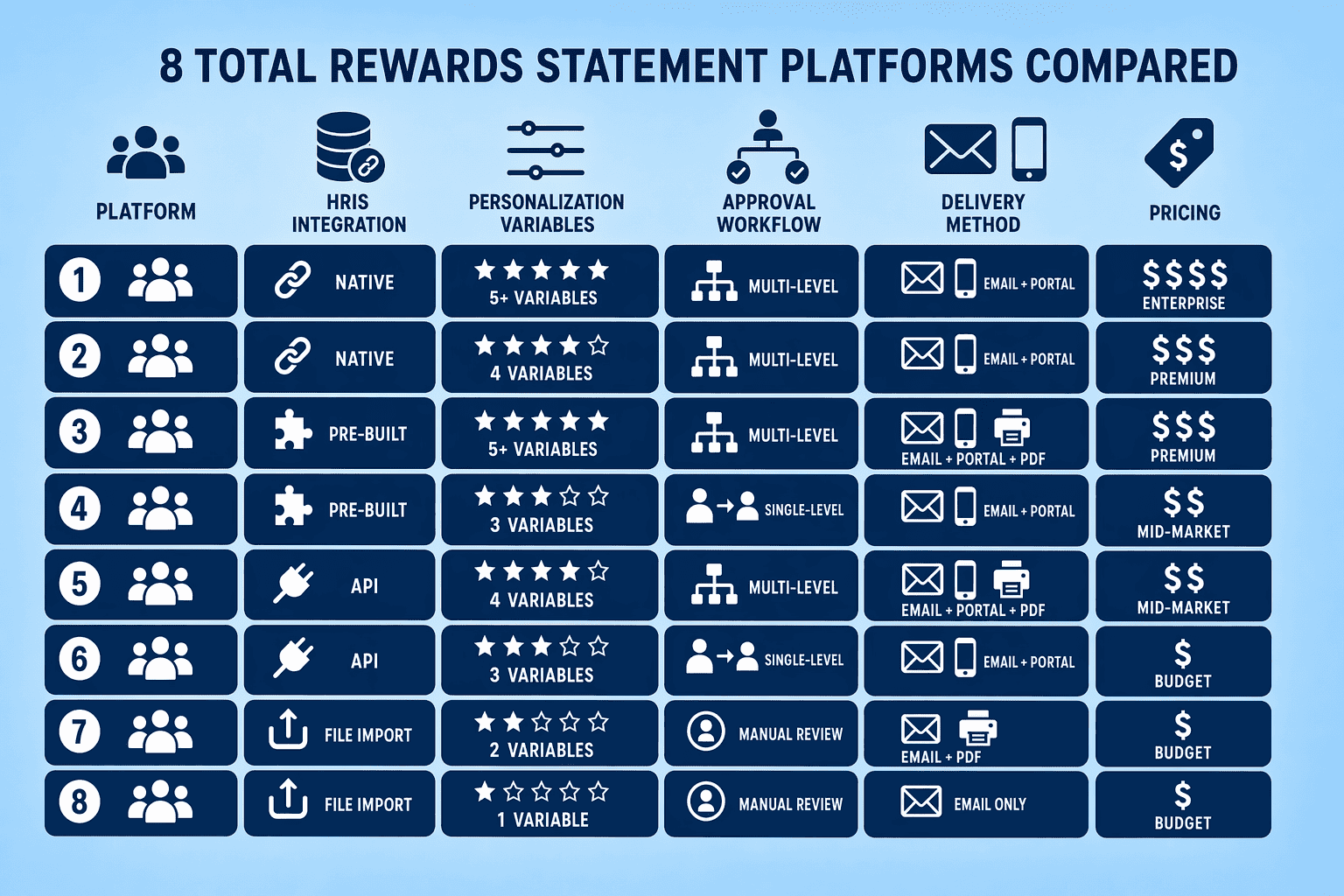
| Platform | HRIS Integration | Personalization | Approval Workflow | Pricing Model | Portal Access |
|---|---|---|---|---|---|
| CompUp | Yes | Yes | Multi-stage | $3/user/year | Yes |
| HRSoft | Yes | Yes | Multi-stage | Enterprise | Yes |
| Pequity | Yes | Yes | Limited | $199/month | Yes |
| Salary.com Raise | Yes | Yes | Yes | Enterprise | Yes |
| Sequoia | Yes | Yes | Limited | Contact | Yes |
| Backstitch | Limited | Yes | Limited | Contact | Yes |
| CompLogix | Yes | Yes | Limited | Contact | Yes |
| Workday Compensation | Yes | Yes | Yes | Enterprise | Yes |
Pricing structures split into three categories: per-employee subscriptions (Pequity at $199/month flat, CompUp at $3/user/year), per-cycle project fees (common for backstitch and CompLogix implementations), and enterprise flat-fee contracts (HRSoft, Salary.com Raise, Workday). Setup timelines range from two weeks for API-integrated platforms like Pequity to eight weeks for custom-branded, multi-tier approval workflows. CompBldr's benchmark of 2,800 statements in four days illustrates the scalability threshold for governed workflows, manual processes typically require three weeks for the same volume.
Key Takeaways: Pequity and CompUp offer transparent per-user pricing with rapid deployment; HRSoft, Salary.com Raise, and Workday serve enterprise buyers needing deep HRIS integration and engagement analytics; backstitch and Sequoia fill mid-market UX-focused niches; CompLogix targets global teams managing multi-currency complexity. Software is not legally required for transparency compliance, laws mandate disclosure, not specific tools, but structured platforms reduce manual workload and approval errors at scale.
Platform capabilities matter only if they align with your operational constraints. Selection frameworks begin with three questions: HRIS ecosystem depth, personalization variable requirements, and approval governance needs.
Selecting the right platform depends on three operational constraints: HRIS ecosystem depth, personalization requirements, and approval governance needs. A structured decision framework helps teams match platform capabilities to organizational complexity.
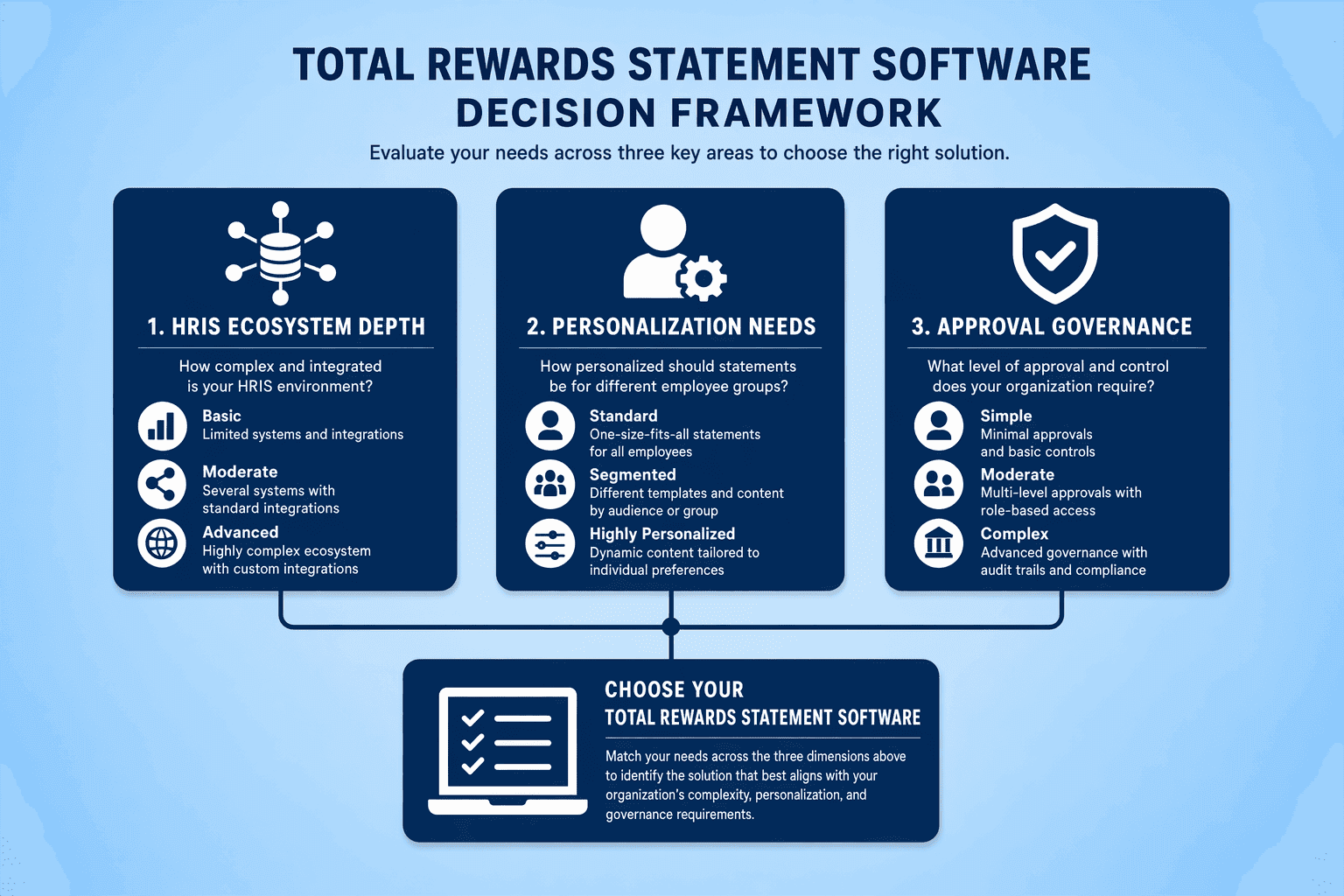
Evaluate integration depth before committing to a platform. Basic solutions support one-way data pulls via CSV or API-only connections, requiring manual mapping for each compensation cycle. Mid-tier platforms offer bi-directional HRIS integration that syncs employee records, compensation changes, and benefits data automatically. Enterprise-grade systems integrate natively with Workday, SAP SuccessFactors, BambooHR, and Darwinbox, eliminating manual reconciliation. CompUp integrates with existing HRIS, payroll, and performance management systems, reducing implementation friction for organizations running multi-system HR stacks.
Basic platforms support 5 to 8 variables (role, location, base salary, annual bonus target, PTO accrual). Advanced platforms support 15 to 20+ variables, including equity vesting schedules, multi-year bonus targets, location-specific benefits, tenure milestones, and custom fields for retention bonuses or sign-on awards. Organizations with complex equity structures, multi-currency payrolls, or differentiated benefits by geography require deeper personalization engines. Assess your variable count before shortlisting, under-scoped platforms force manual workarounds that eliminate automation gains.
Simple workflows (single approver, PDF-only delivery) suit small teams with uniform compensation structures. Multi-stakeholder organizations need governed approval chains with audit trails, finance reviews budget impact, legal verifies equity language, HR approves final distribution. Platforms offering Review → Approve → Distribute workflows prevent premature publication and ensure data accuracy before employees see statements. CompUp provides multi-level appraisal workflows and real-time budget simulations, supporting Tier 2 and Tier 3 governance requirements without forcing teams into over-engineered processes.
Also Read: Implementation Timeline and Workflow Considerations
Choosing the right platform is half the battle. Successful deployment depends on a structured implementation process that addresses data audits, template configuration, and workflow testing before the first cycle launches.
Moving from manual spreadsheets to automated total rewards statements requires a structured implementation process. Most platforms deliver the first cycle in 2-4 weeks when organizations follow a phased approach that prioritizes data accuracy and stakeholder buy-in.
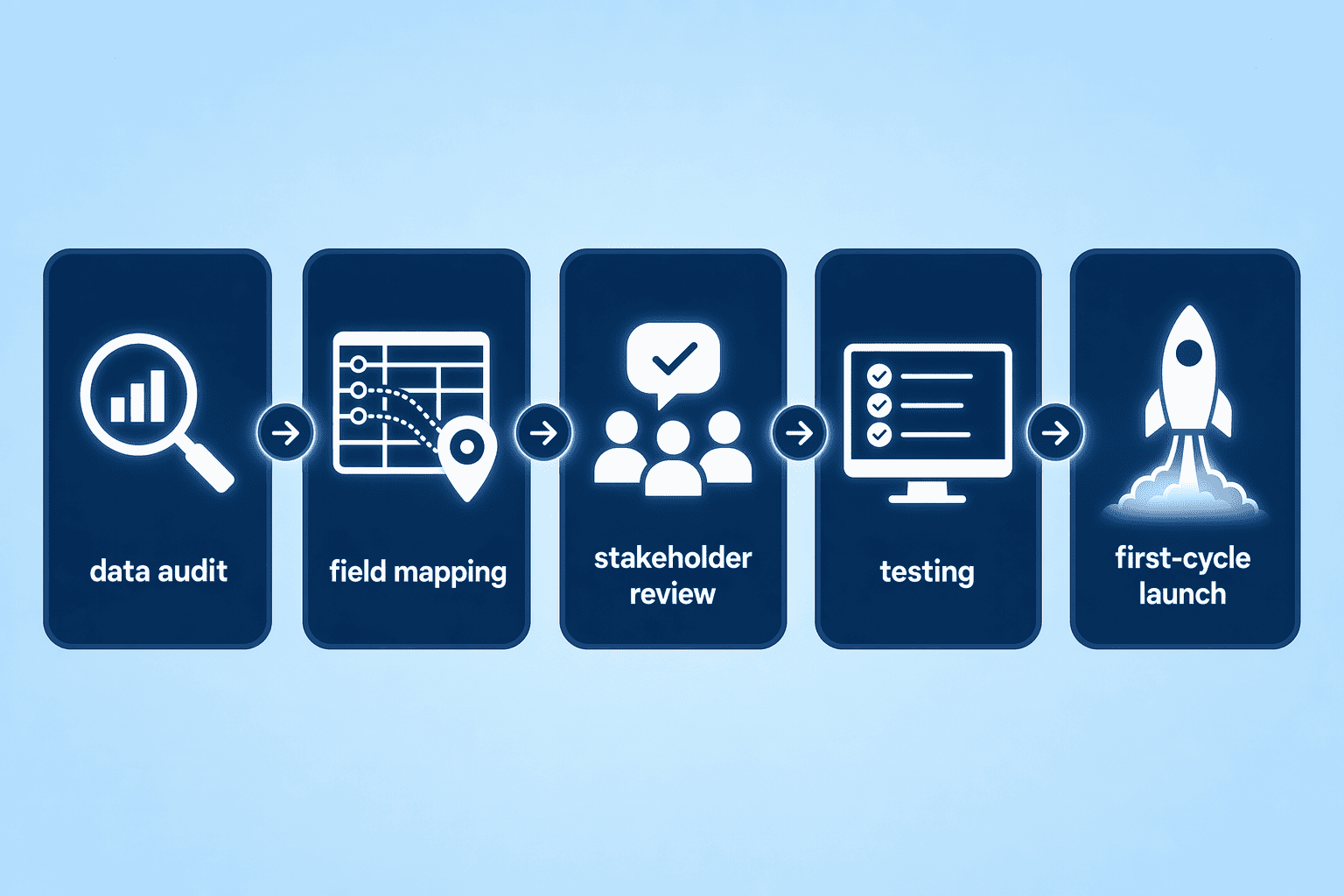
Before launching the first cycle, HR teams audit existing data sources to ensure accuracy and completeness. This step involves mapping HRIS fields to the platform's data model, reconciling payroll system records with benefits provider data, and syncing equity plan information from cap table management tools. Platforms that support bi-directional data flow eliminate manual reconciliation by maintaining a single source of truth across compensation, benefits, and equity systems. Teams typically complete this audit in 3-5 business days when IS departments provide structured data exports and API access.
The initial setup phase focuses on template selection, branding customization, and workflow configuration. Here are the core setup steps:
CompUp's unified workflow uses a single data model for planning, transparency, and equity analytics, eliminating the multi-system reconciliation that typically extends setup timelines. Organizations using drag-and-drop builders complete this phase in 7-10 business days.
After the first cycle, teams establish a governed timeline to maintain data accuracy and meet distribution deadlines. The standard cycle follows a four-stage process: data freeze (lock compensation data 5 days before review), review (managers validate individual statements over 3 days), approval (HR and legal sign off within 2 days), and distribution (secure portal delivery or PDF email). Platforms with automated workflows reduce manual validation time by flagging outliers and enforcing business rules at each checkpoint. Organizations running quarterly or semi-annual cycles schedule these checkpoints to align with payroll close dates and merit cycle timelines.
Key Takeaways: Implementation success depends on upfront data mapping, phased rollout through a pilot group, and governed cycle checkpoints that maintain accuracy at scale. Most platforms deliver the first cycle in 2-4 weeks when teams prioritize data validation over feature exploration.
Modern total rewards statement software transforms compensation communication from static annual PDFs into dynamic, personalized engagement tools. By automating data integration, personalizing content to individual employee circumstances, and providing year-round portal access, organizations can ensure employees understand and appreciate the full value of their compensation packages beyond base salary.
CompUp delivers this transformation through its unified platform, combining drag-and-drop statement builders, governed approval workflows, and seamless HRIS integration at $3 per user annually. The platform generates personalized statements automatically at cycle close, consolidating salary, benefits, equity, and bonuses into branded documents that employees can access digitally year-round.
Ready to see how structured total rewards communication scales without disrupting your payroll cycles? Book a free demo with CompUp to explore how automated statement generation can transform your compensation transparency strategy.
Total compensation statements focus narrowly on cash compensation and equity, while total rewards statements include benefits, perks, work-life programs, and recognition. HRSoft defines total rewards across five components: compensation, benefits, work-life balance, recognition, and development, providing a thorough view of employer investment beyond base salary.
Total rewards statements are not legally required in most jurisdictions. They serve as a transparency best practice that helps employees recognize the full value of employer investment beyond base salary. While disclosure laws mandate pay transparency in certain regions, they do not prescribe specific statement formats or tools.
First-cycle setup typically takes 2-8 weeks depending on HRIS integration complexity, data mapping, and template customization. Platforms with API-driven connectors require more upfront configuration but simplify subsequent cycles, while CSV-based tools deploy faster initially but demand ongoing manual data preparation.
The most common HRIS integrations include Workday, SAP SuccessFactors, BambooHR, Darwinbox, ADP, and UKG. Platforms vary in native connectors versus API-only integration depth; basic solutions support one-way data pulls via CSV or API-only connections, requiring manual mapping for each compensation cycle.
Portal access enables year-round on-demand queries and dynamic updates, ideal for global or complex organizations. PDF email is simpler for one-time annual delivery but lacks interactivity. PDF-only delivery treats total rewards as an annual announcement rather than an ongoing conversation, limiting employee engagement.
Basic platforms support 5-8 variables such as role, location, base salary, annual bonus target, and PTO accrual. Advanced platforms support 15-20+ variables, including equity vesting schedules, multi-year bonus targets, location-specific benefits, tenure milestones, and custom fields for retention bonuses or sign-on incentives.
Pricing structures split into three categories: per-employee subscriptions like Pequity at $199/month flat and CompUp at $3/user/year, per-cycle project fees common for backstitch and CompLogix implementations, and enterprise flat-fee contracts for HRSoft, Salary.com Raise, and Workday. Per-employee suits mid-market, per-cycle suits seasonal organizations, flat-fee suits large enterprises.
Community Manager (Marketing)
As a Community Manager, I’m passionate about fostering collaboration and knowledge sharing among professionals in compensation management and total rewards. I develop engaging content that simplifies complex topics, empowering others to excel and aim to drive collective growth through insight and connection.
Revolutionizing Pay Strategies: Don't Miss Our Latest Blogs on Compensation Benchmarking