
Your finance team tracks every line item. Payroll knows the exact salary and bonus payout for every employee. Yet a 75% of companies globally are reporting a talent shortage, and a 41% of organisations rate their compensation and total rewards programmes as only somewhat developed. Most employees see only half the picture, the cash that hits their bank account. The employer-paid health premiums, the 401(k) match, the learning stipend, the stock grant, these remain invisible line items on a P&L, invisible to the very people they are meant to retain.
A Total Rewards Statement (TRS) closes that visibility gap. When done right, a total rewards statement (TRS) is a personalized document that provides a thorough overview of the overall value the organization offers to the employee as part of the employment relationship, and the impact on retention is immediate, quantifying these hidden employer investments can reduce voluntary turnover by up to 25%.
This is not a pay stub. A pay stub reports gross-to-net wages. A TRS layers in every employer-paid contribution and every non-monetary perk, then frames it as a strategic investment. This guide walks you through an 8-step creation process, from defining your total rewards philosophy to measuring the retention impact, so your organization stops silently funding benefits nobody sees.
A statement is only as credible as the strategy behind it. Pin down the compensation philosophy first, then build the document.
With a philosophy in place, the next phase inventories everything the organization actually delivers.
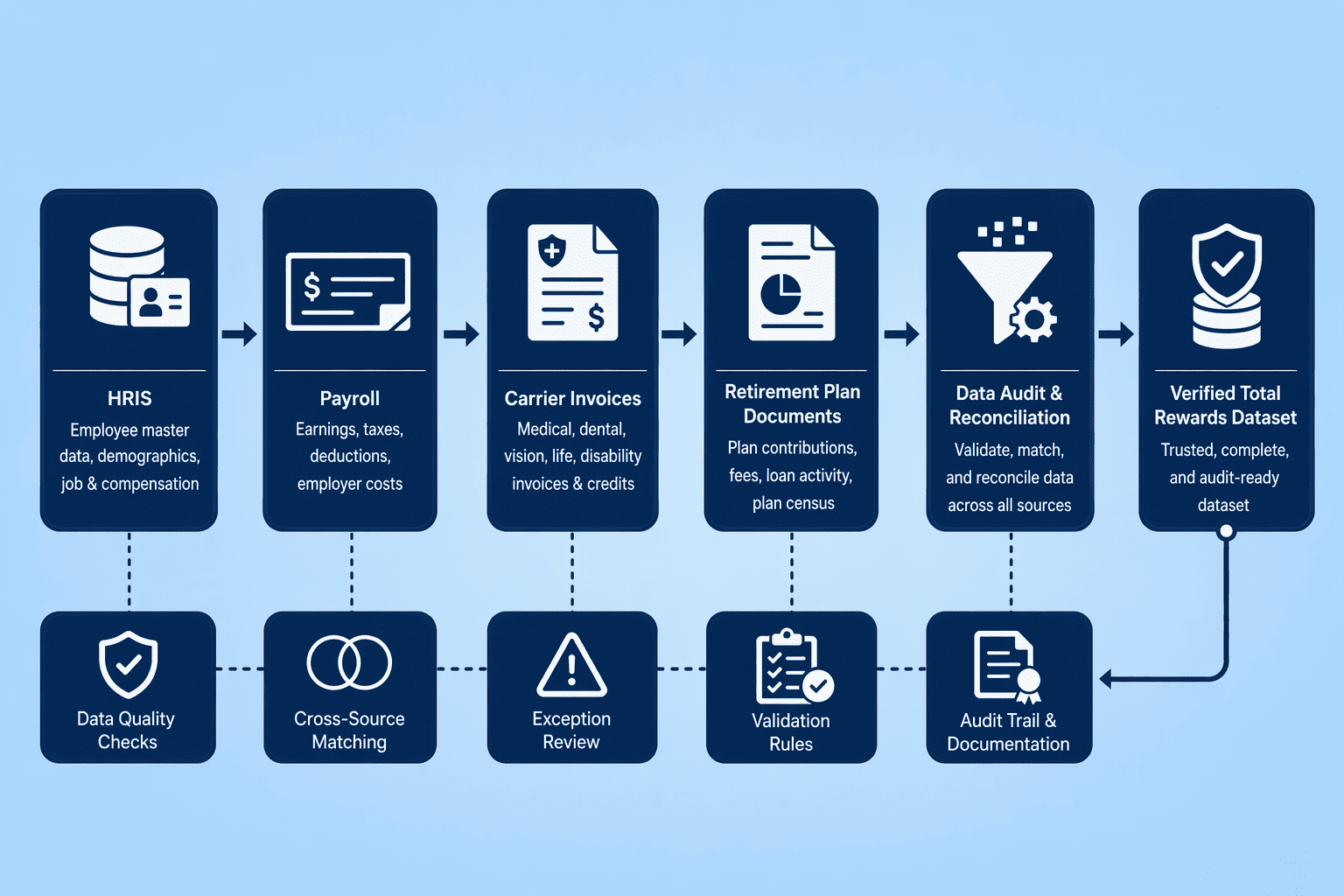
An error in the statement destroys trust faster than no statement at all. Before you design a single chart, inventory every monetary and non-monetary reward with precision.
Pull base pay, bonuses, and variable compensation from the HRIS. Cross-reference employer health premiums against carrier invoices and the ACA reporting data you already file. Verify the 401(k) match formula, vesting schedule, and any discretionary profit-sharing contributions against the current plan document.
ERISA fiduciary standards demand that the numbers you present to an employee match the numbers the plan reports to the Department of Labor. A mismatch here is a compliance failure.
Include softer items such as learning stipends, gym memberships, and commuter benefits, and decide upfront whether to value them at the employer cost or an estimated retail equivalent. An internal review workflow with compensation, benefits, and payroll sign-off must be documented before any data enters a template.
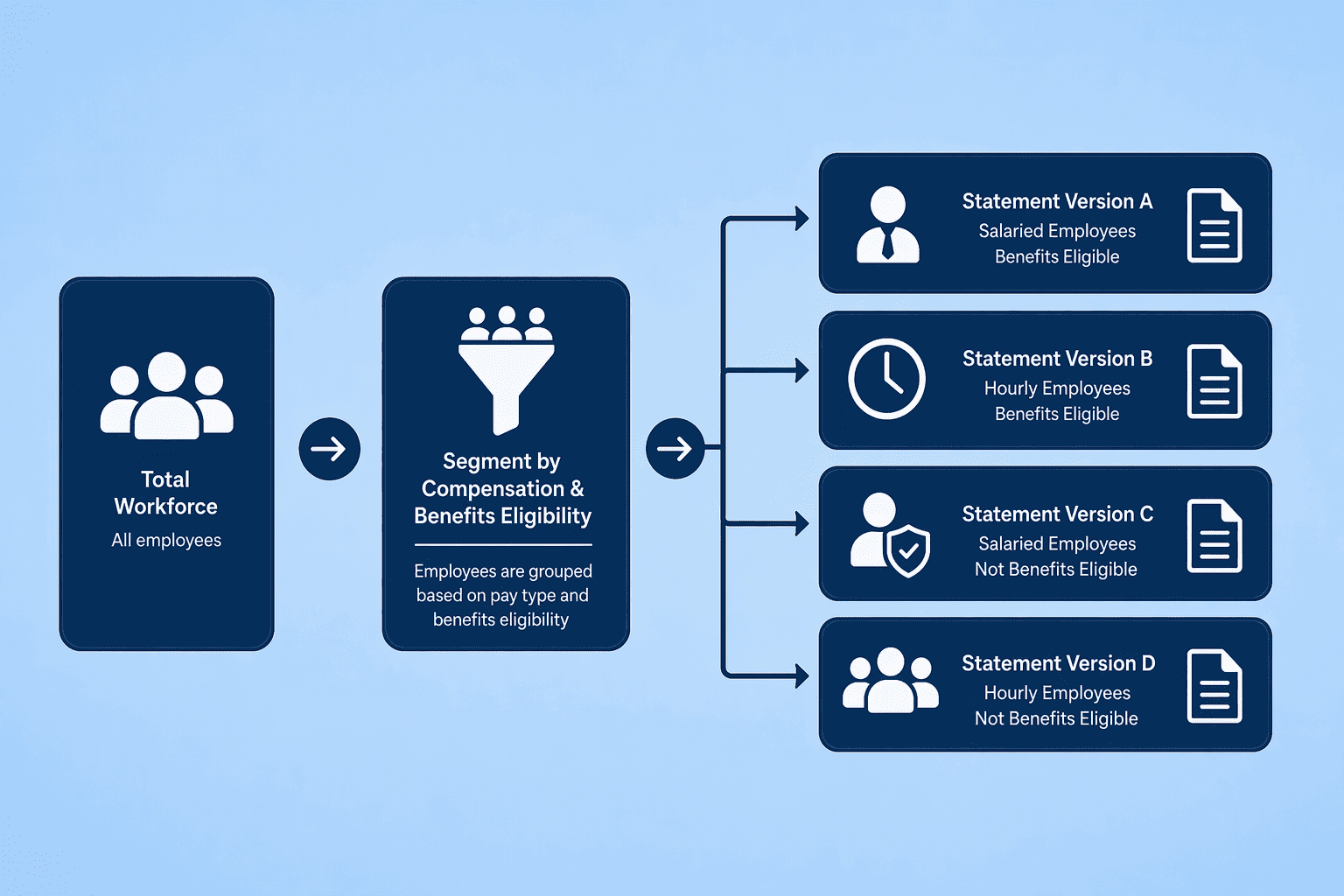
A single template sent to every employee confuses people. When someone who gets no equity sees a line of zeros where their stock should be, you have created a helpdesk ticket, not a reward.
Different workers have different eligibility. A new hire waiting on 401(k) enrollment does not have the same total rewards picture as a tenured executive. The fix is segmentation: split your population into groups that share the same compensation and benefits profile, then build a statement version for each group. A total rewards template consists of a condition rule that controls which workers can view their statement and the total rewards sections that display on the statement.
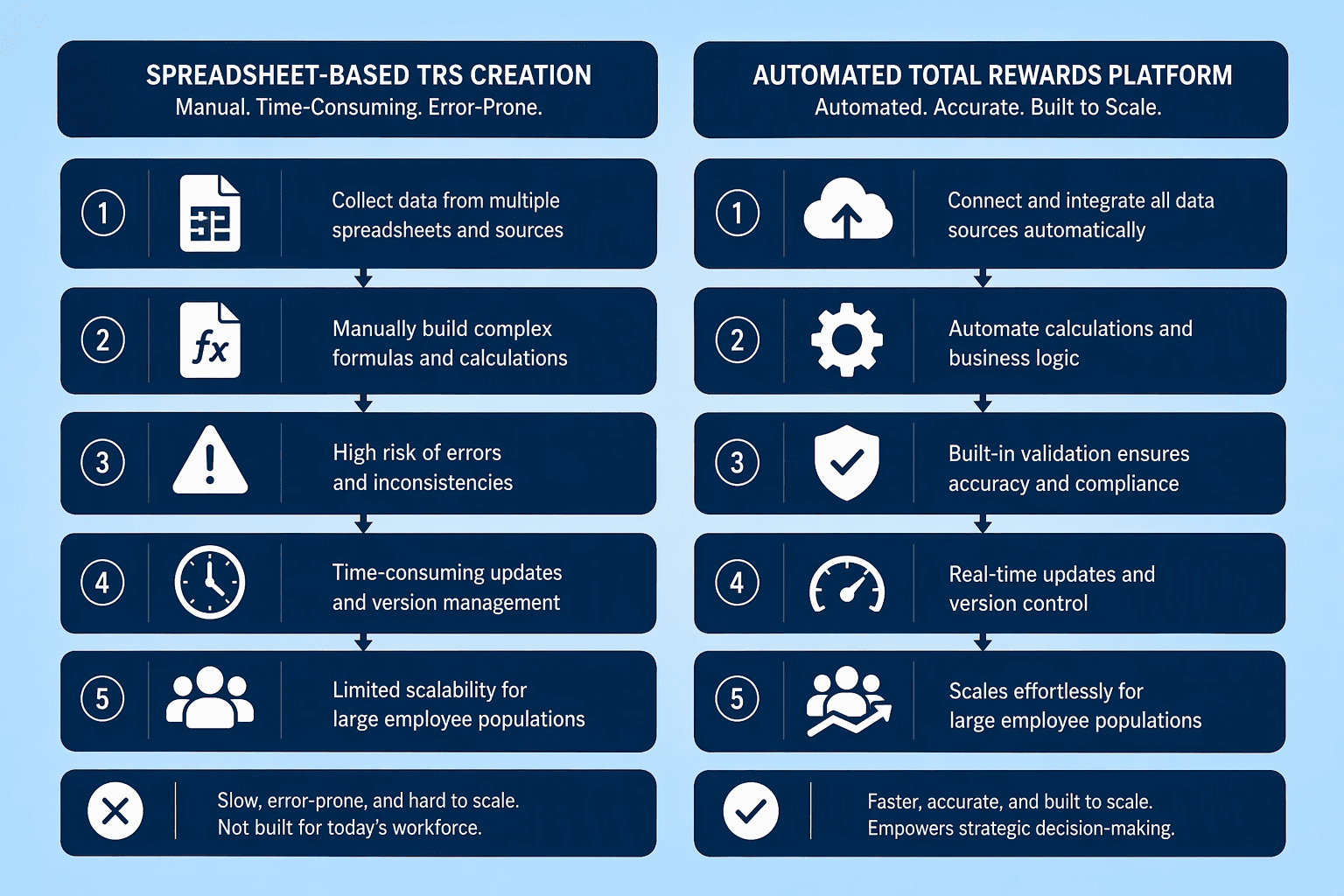
Manual compilation in spreadsheets works for a pilot of twenty employees. It collapses at two hundred. The technology choice separates a sustainable annual process from a multi-month administrative spiral.
Dartmouth's Total Rewards package is a thorough support system for employees' financial future, physical and mental health, and lifelong growth, but delivering that package in a clear, personalized document requires automation. Oracle HCM Cloud, for instance, total rewards templates are designs created by compensation administrators that define how total rewards statements are presented to employees and managers in self service transactions, and to administrators when they administer total rewards statements. The system automatically enters the statement's sections and all the label texts when a new template is created by the compensation administrator.
Workday offers comparable template functionality with condition rules and multi-section displays. For organizations without a large HCM suite, compensation-specialized platforms provide a lighter path. Some platforms provide market data across salary, variable pay, equity, or benefits. Some run salary reviews, bonuses, long-term incentives, and pay-equity workflows. Others specialize in communicating the complete rewards package to employees.
Statement generation does not require full benchmarking and planning modules. Statement tools can be excellent communication products without managing benchmarking, pay structures, or planning. Choose based on the job you need the tool to do, communicate total value, not build salary structures from scratch.
Design is where data becomes a story. The standard anatomy of a TRS has six section sets, and every platform generation process starts from them. Default template elements include six section sets: Summary, Cash Pay, Health and Wellness, Retirement Savings, Company Stock, and Other Benefits.
The Summary section earns the greatest visual weight. It sits at the top as a dashboard, aggregating the value from every other section into a total rewards figure. The Summary section can only have one section designated as the statement summary, and it summarizes the contents of other sections, requiring at least one non-summary section defined in the template. Place it prominently. Employees should see the full employer investment inside three seconds of opening the document.
Cash Pay follows: base salary, any bonus or variable pay earned in the period, and overtime where applicable. For employers using a platform like Dayforce, base salary subsection shows the annual salary set in the Employment > Employment Settings screen in People. Health and Wellness captures employer-paid medical, dental, and vision premiums, plus an Employee Assistance Program allocation.
Note that the amount shown for the Employee Assistance Program is a general amount allocated to all eligible employees, not related to actual usage. Retirement Savings shows the 401(k) match, profit-sharing contributions, and any pension accrual if applicable, each tied to the current plan year.
Company Stock covers equity grants and RSUs, though Workday does not round stock values on the Total Rewards Statement even when a rounding rule is applied. Other Benefits is the catch-all for learning stipends, commuter subsidies, and any bonus leave programs your organization chooses to include.
Apply layout best practices aggressively. Use a summary block at the top, and place detailed breakdowns below in expandable charts or side-by-side bar graphs. The Total Rewards Summary is updated annually and is available only to benefits-eligible employees, so lock the timeframe at the top. Ensure reward items are unique across sections; reward items must be unique across combined sections; the same reward item cannot exist in more than one section. A compensation administrator establishes this uniqueness in the template setup before any employee data is loaded.
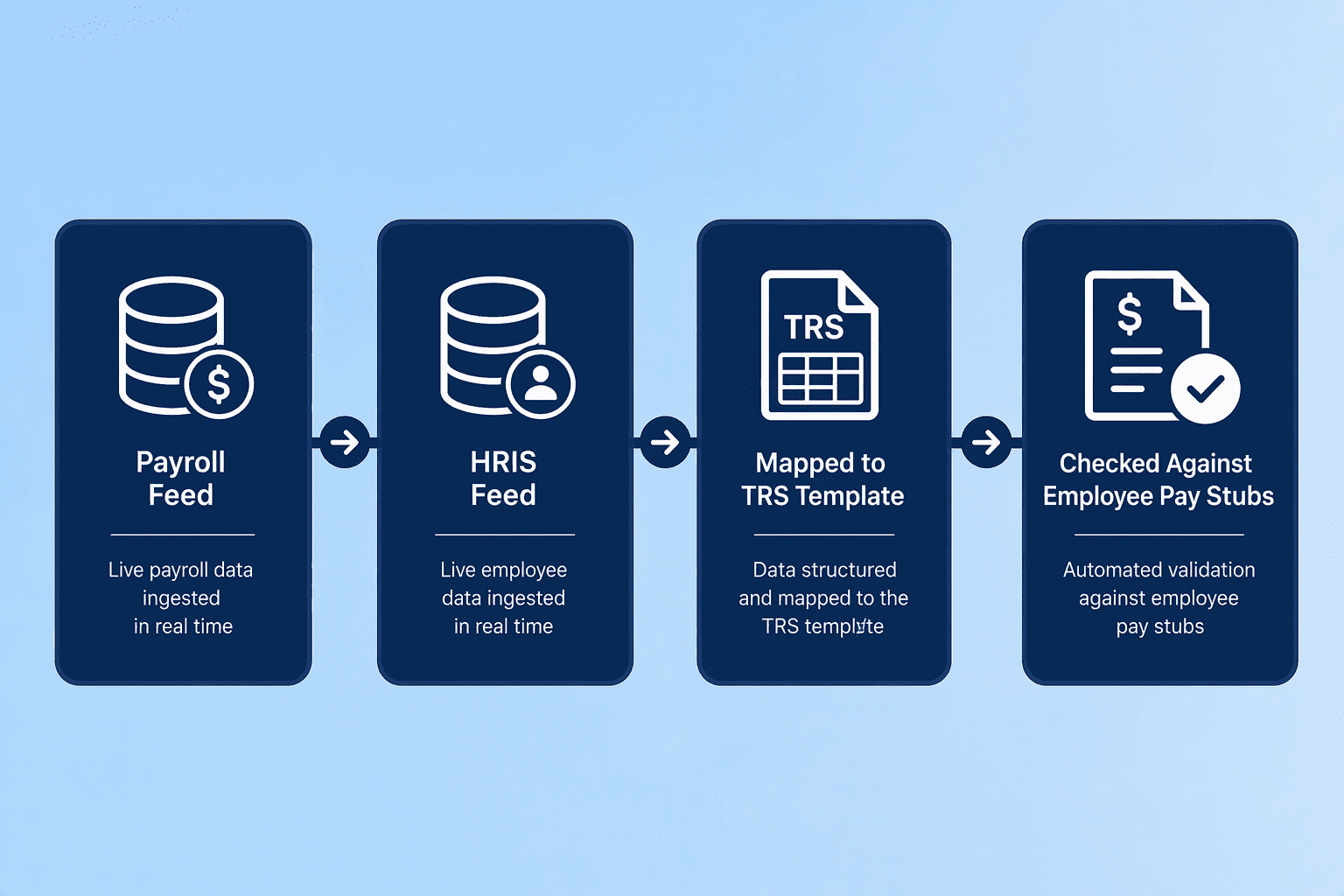
This is the highest-risk phase. You are pulling live data from multiple systems, mapping it into statement fields, and generating documents that employees will scrutinize against their pay stubs.
Feed payroll and HRIS data into the template via batch or API. For Oracle HCM users, the Template ID is a key element needed when processing or generating statements for an employee population. Map each compensation element to a reward item: base salary, bonus, and overtime map to Cash Pay, while employer 401(k) match and health premiums map to their respective sections. If your tool permits it, create subsections within Pay. Dayforce, for example, lets you define you can add one base salary and up to five additional earning subsection types for the Pay section type, pulling earning codes from payroll setup to surface detail that generic comp reports miss.
Data reconciliation sits at the core of this step. Cross-reference employer health premiums shown on the statement against the most recent carrier invoice. Verify the 401(k) match displayed against the payroll deduction and employer contribution records.
Match equity grant values against the cap table. Errors are disproportionately costly here; an overstated health premium is an ERISA misrepresentation, and an understated match creates employee distrust when they check their plan statement. Build a formal review workflow requiring sign-off from Compensation, Benefits, and Payroll before any statement batch generates.
Once each department signs off, run a pilot batch for a small segment. Have five employees walk through their statements and report any discrepancies.
Correct them, re-validate, and only then flip the switch for the full population. The audit trail from this process becomes your compliance documentation.
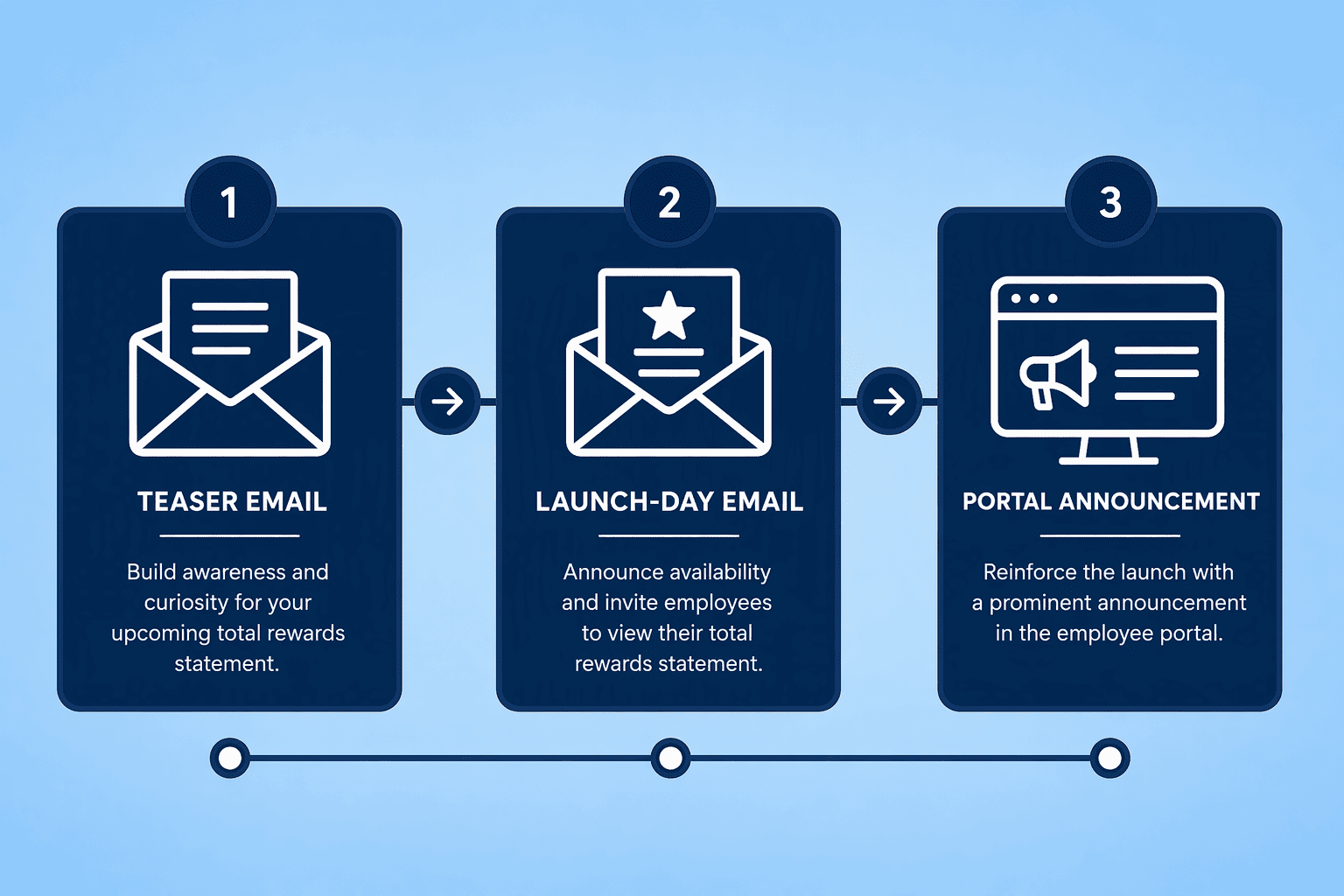
A perfect statement that nobody opens is a waste of the preceding six steps. Treat the TRS release as a total rewards education campaign, not a document distribution exercise.
Start with a teaser email 48 hours before launch. Announce that a personalized statement showing the full value of their compensation is coming. Include an estimated average employer contribution figure for a mid-tenure employee to pique interest. On launch day, push an email with a direct link to the self-service portal where the statement sits. If your platform supports print, offer a mail option for employees without regular digital access.
Follow with manager talking points within 24 hours. Managers need a one-sheet that explains how to read the Summary section and where to direct employee questions. The core message: 'This statement reflects the total investment this organization makes in you.'
Pay, career, and departmental support questions should go to an employee's HR Business Partner, not to managers, so the one-sheet routes technical questions to HR. Schedule a second touch at 7 days in.
A short survey measures initial comprehension, and a FAQ page addresses the top questions. The campaign closes with a 30-day pulse check that feeds directly into Step 8.
Build measurement into the statement lifecycle from Day 1. Your organization tracks a 25% reduction in voluntary turnover over 12 months. The immediate cycle works on shorter loops.
| Metric | Definition | Target | How to Measure |
|---|---|---|---|
| Open Rate | Percentage of eligible employees who opened the statement within 30 days of launch | 70% or above | Track via self-service portal analytics or email click-through data |
| Understanding Score | Employee self-reported understanding of total rewards value on post-campaign survey | 80% rating 'good' or 'excellent' | Include in the 7-day and 30-day pulse surveys |
| HR Query Volume | Number of compensation- and benefits-related tickets filed in the 60 days post-launch vs. same period prior year | 20% reduction | Pull from HR ticketing system and filter by category |
| Statement Accuracy Rate | Percentage of statements that contain zero documented errors after the reconciliation workflow | 99% or above | Count error tickets filed by employees divided by total statements generated |
You iterate annually, after the appraisal and compensation cycle closes. IRS regulations lock most benefits until the next plan year unless you have a qualifying life status change. Time the TRS update to the plan year rather than trying mid-cycle adjustments. Update the data: health premiums, 401(k) match formulas, equity grant values. ERISA compliance requires that any retirement plan value section uses the current plan document as its source. Run the full reconciliation again. Re-segment the workforce for promotions, terminations, and new hires.
Eight steps take a total rewards statement from a payroll number to a retention tool. Done right, it cuts voluntary turnover by up to 25%. That matters because most of what an employer spends on a person never shows up on a pay stub, health premiums, retirement contributions, training, licensing, the employer share of payroll taxes.
A TRS puts those costs in one place, per employee, in dollars. The statement works when the numbers are correct and the framing is plain. When either is off, the document backfires.
ERISA and ACA both have disclosure obligations that a total rewards statement can help satisfy, but only if the figures line up with plan documents and W-2 reporting. Estimates create liability. Exact numbers, pulled from payroll and carrier invoices, do the opposite, they build a record the company can stand behind.
Annual refresh keeps the statement useful. Salary bands shift, benefit costs rise, and a person's tenure ticks forward. A stale TRS is worse than none; it signals nobody is paying attention. An updated one tells an employee the organization noticed they stayed another year and put real money behind that relationship. If you're weighing options, CompUp is worth a closer look.
A total rewards statement is a personalized document that quantifies the full value an employer provides an employee. Core components include cash pay (salary, bonus), health and wellness benefits (employer-paid premiums), retirement savings (401(k) match), company stock, and other benefits like learning stipends or commuter subsidies. A Summary section aggregates these into one total figure.
Most employees see only their net pay, missing entirely the 30 to 40% of total compensation employers invest in benefits and retirement contributions. A TRS makes this hidden investment visible, which directly reduces voluntary turnover, organizations that effectively communicate total rewards value see up to a 25% drop in attrition.
The 8-step process moves from defining the organization's total rewards philosophy, through auditing all monetary and non-monetary offerings, segmenting the workforce for personalization, selecting a technology platform, designing the statement layout with core components, populating and reconciling data feeds, launching a multi-channel communication campaign, and finally measuring impact to iterate annually.
Oracle HCM Cloud and Workday offer dedicated template functions with automated section grouping, condition rules for worker inclusion, and chart generation. Compensation-specialized platforms like CompUp can also generate personalized statements at the close of an appraisal cycle without requiring a full HCM suite. The choice depends on your existing tech stack.
A pay stub reports gross wages, deductions, and net pay. A total rewards statement goes far beyond that to include employer-paid health premiums, 401(k) matches, equity grants, learning stipends, and any EAP allocation, all items an employee never sees on a pay stub but that constitute a significant portion of the employer's total investment.
ERISA fiduciary standards govern the accurate reporting of retirement plan values and require the numbers in a TRS to match the plan's official documents. ACA rules affect how employer-sponsored health coverage costs are presented. There is no standalone federal mandate specifying a TRS format, but misrepresenting plan values creates legal risk under ERISA.
Community Manager (Marketing)
As a Community Manager, I’m passionate about fostering collaboration and knowledge sharing among professionals in compensation management and total rewards. I develop engaging content that simplifies complex topics, empowering others to excel and aim to drive collective growth through insight and connection.
Revolutionizing Pay Strategies: Don't Miss Our Latest Blogs on Compensation Benchmarking