
Workforce planning tools that integrate compensation planning eliminate the operational gap between headcount forecasts and pay budgets, reducing budget overruns and pay-equity blind spots.
This guide evaluates platforms that unify workforce and compensation workflows, covering HRIS compatibility, scenario-modeling capabilities, and decision criteria for unified versus point-solution approaches.
Workforce planning tools that include compensation planning close the operational gap between headcount forecasts and pay budgets — disconnected systems create budget overruns, pay-equity blind spots, and reconciliation overhead that erodes the value of workforce planning itself. When headcount models run in isolation from compensation cycles, finance teams reconcile budget actuals against outdated salary assumptions, HR discovers pay-equity disparities only after offers are signed, and scenario planning becomes a guessing exercise rather than a decision framework.
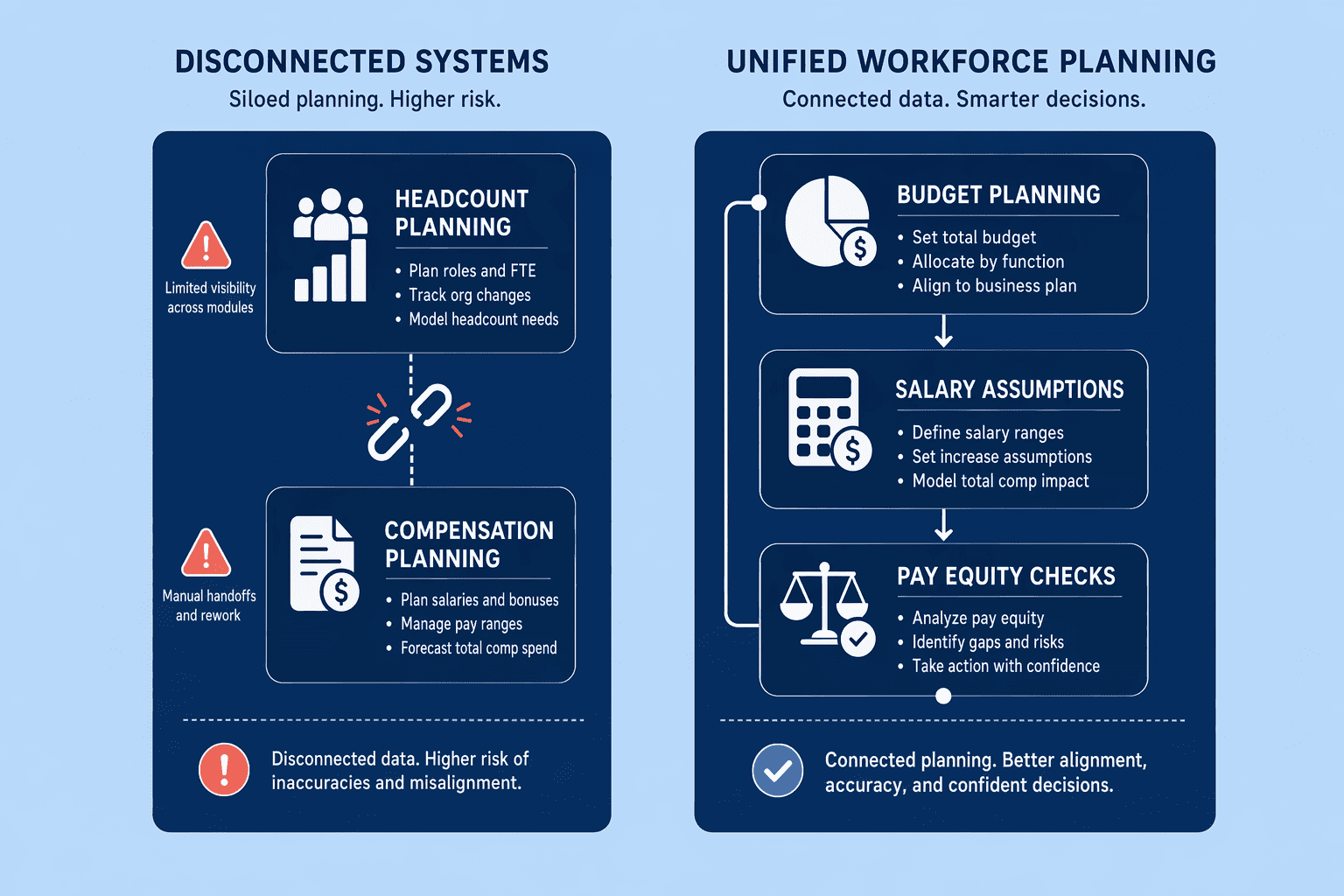
Organizations running separate headcount and compensation tools face three recurring failure modes.
First, budget reconciliation overhead compounds across every planning cycle — finance teams manually re-sync approved headcount with actual salary bands, consuming hours that should be spent on strategic forecasting.
Second, pay-equity risk surfaces late: without real-time visibility into how new hires and promotions affect compa-ratios and internal equity, compliance audits reveal disparities that could have been corrected during the planning phase.
Third, scenario modeling loses fidelity — modeling a 15% workforce expansion without integrated compensation data means finance cannot accurately forecast cost implications or evaluate trade-offs between hiring strategies.
Integration exists on a spectrum. Native workflow integration embeds compensation logic directly into headcount planning — when a manager models a new hire, the system calculates salary band impact, equity cost, and budget utilization in real time. Platforms like CompUp, Workday, and SAP SuccessFactors offer varying degrees of this integration, though buyers should verify claims about native workflows versus bolted-on API connections in live demos rather than relying on marketing materials alone. Bolted-on integrations require manual data syncs or scheduled batch updates — acceptable for annual planning cycles but insufficient for continuous scenario modeling where real-time budget visibility drives hiring decisions.
Evaluating compensation-integrated workforce tools requires assessing three dimensions tied directly to outcomes.
Workflow integration depth:
Does the platform calculate compensation impact inline during headcount modeling, or does it require exporting data to a separate compensation module?
HRIS compatibility: can the system reconcile approved positions back to your core HR system without manual CSV uploads?
Scenario modeling fidelity: can you compare multiple hiring strategies with accurate cost projections that reflect current salary bands, equity pools, and benefits loading?
These criteria anchor the selection framework detailed in subsequent sections and separate tools that market integration from those that deliver it operationally.
Understanding why integration matters sets the foundation for evaluating the technical features that connect headcount forecasts to compensation cycles.
Workforce planning tools that integrate compensation capabilities shift from headcount-only forecasting to unified workforce-compensation workflows. Three technical features form the operational bridge: real-time compensation benchmarking during planning cycles, automated pay-equity audits as a byproduct of unified data, and budget scenario modeling that surfaces compensation impact alongside headcount changes. CompUp supports real-time compensation benchmarking, automated pay-equity audits, and unified workforce-compensation workflows, capabilities that prevent budget misalignment and compliance blind spots when headcount planning and compensation cycles run in isolation.
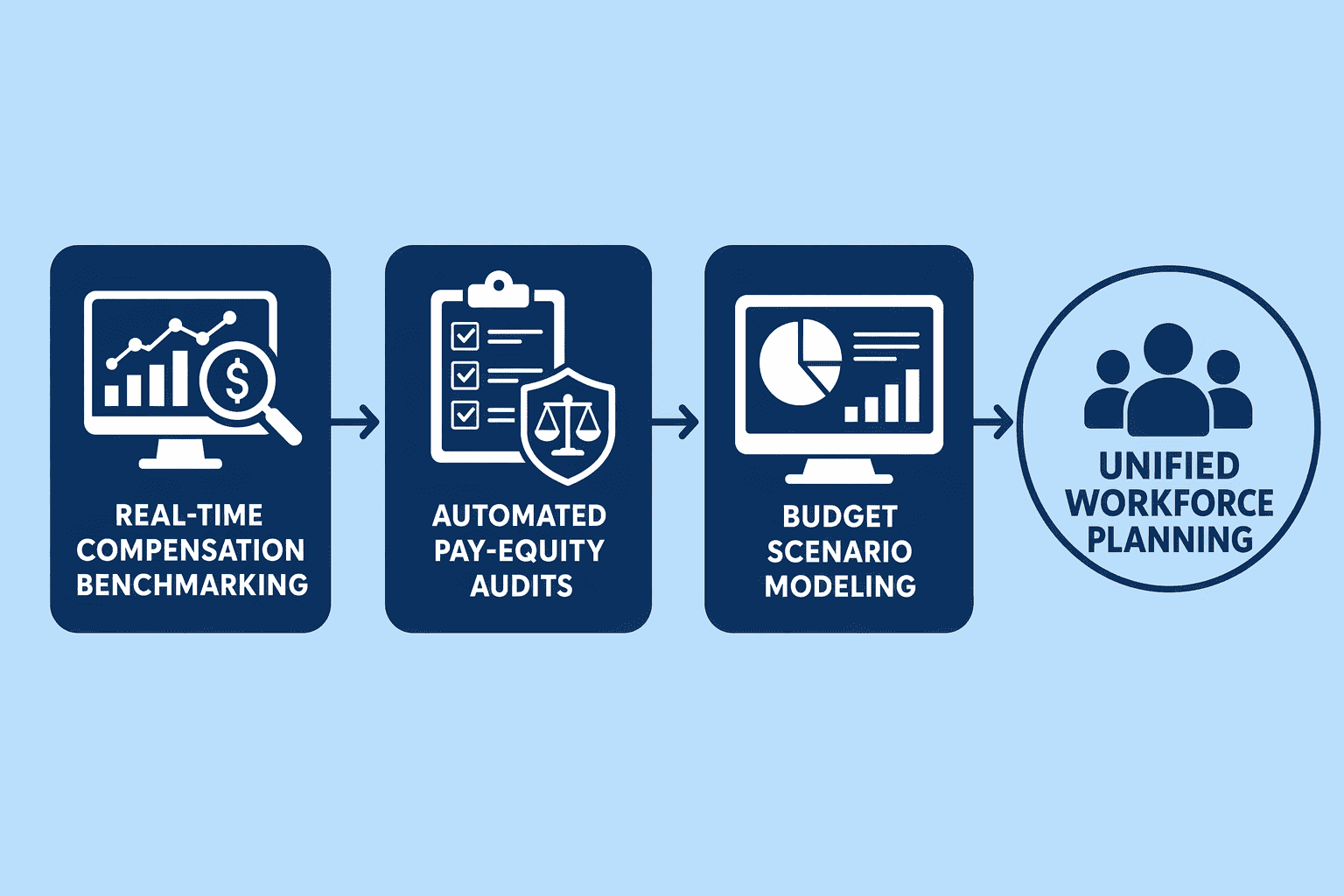
Generic workforce planning platforms track headcount and labor cost at a surface level, they forecast hiring velocity but lack market-rate context to validate compensation assumptions. Integrated platforms surface real-time market data during scenario modeling, allowing planners to test whether proposed salary ranges align with industry benchmarks before committing budget. SAP SuccessFactors Compensation manages rewards and compensation with real-time insights using a single, unified solution, centralizing oversight of compensation planning and enabling teams to optimize programmes for local markets. CompUp provides real-time compensation benchmarking, giving planners immediate visibility into market positioning while building headcount scenarios.
This prevents the common failure mode: budget allocated based on outdated salary assumptions, followed by costly revision cycles when offers don't match candidate expectations.
Compensation-workforce platforms automate pay-equity audits as a byproduct of planning cycles, a compliance workflow no standalone workforce tool frames. When headcount data and compensation records exist in a single system, equity analysis runs continuously rather than as a periodic manual exercise. The system provides real-time pay equity analysis, compa-ratio tracking, and compliance automation, surfacing pay disparities during headcount expansion before they become compliance liabilities. SAP SuccessFactors uses calibration tools to tie employee performance with rewards and make more objective compensation decisions, supporting a pay-for-performance culture. CompUp streamlines pay equity analysis with real-time insights, turning what most organizations treat as an annual audit into a continuous validation layer embedded in workforce planning.
What-if planning capabilities that connect headcount changes to compensation budget impact distinguish integrated platforms from point solutions. Organizations model scenarios like "hire five engineers at mid-level versus three seniors" and immediately see total compensation cost, not just headcount delta. SAP SuccessFactors simulates different budget scenarios to determine optimal compensation guidelines and emulates various business outcomes to validate forecasting and spend on bonuses. CompUp combines real-time market data with Budget Simulation for financial forecasting and Pay Equity analytics to detect and close pay gaps, enabling planners to test promotion costs, geographic pay variations, and equity-adjustment scenarios in parallel with headcount modeling.
Suggested Read: Learn how predictive HR analytics connects workforce planning to compensation strategy.
Suggested Read: How to Evaluate HRIS Compatibility for Unified Workflows
Once you understand the core features that bridge headcount and compensation workflows, the next critical step is ensuring your chosen platform syncs seamlessly with existing HRIS infrastructure.
Many workforce planning tools list HRIS integrations but don't clarify whether they support real-time bidirectional data flows or require manual exports. When reviewing enterprise workforce planning systems, verify whether the platform syncs compensation changes automatically or forces periodic batch updates. CompUp provides bi-directional HRIS integration, ensuring that headcount adjustments and salary revisions flow both ways without data-reconciliation delays.
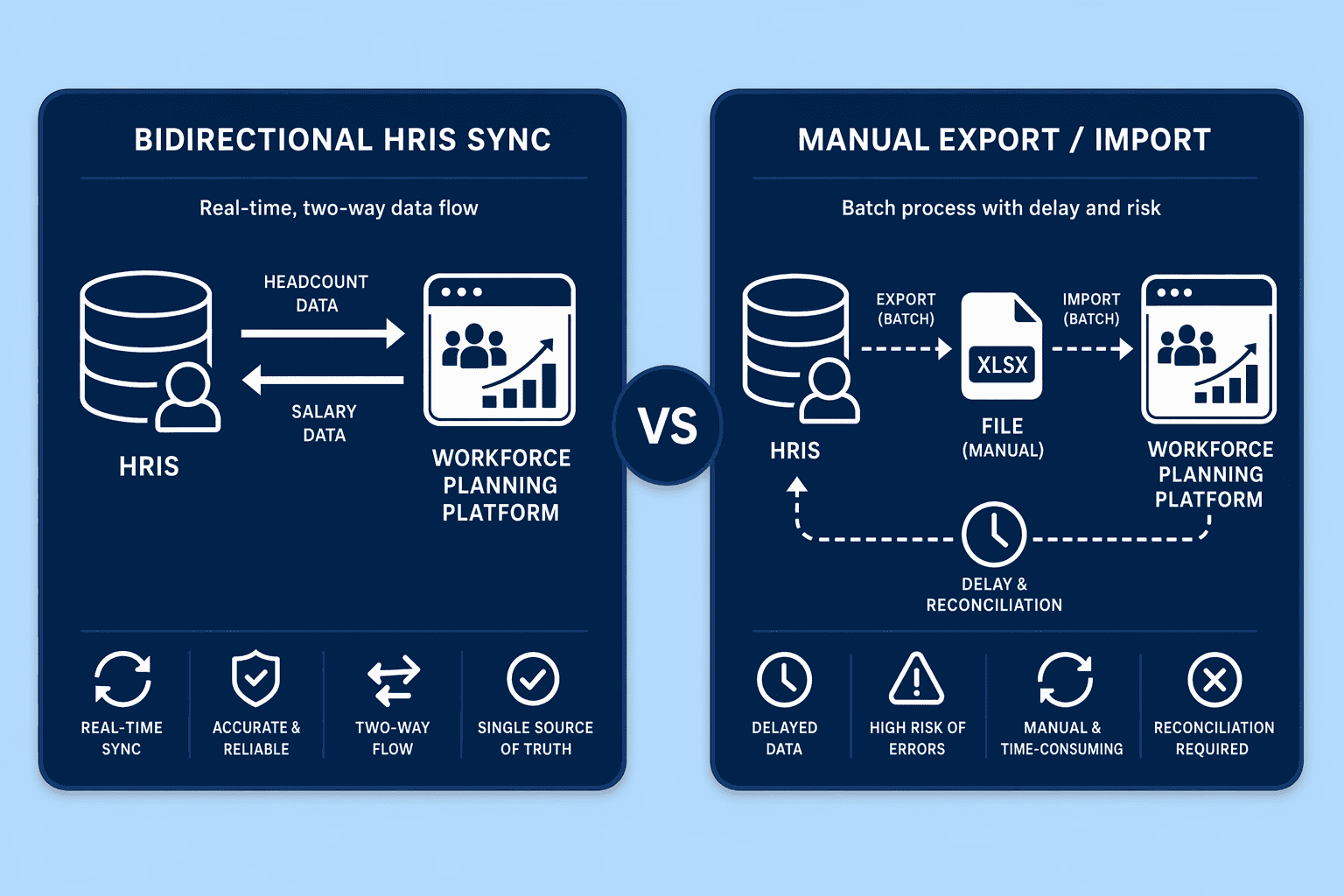
Integration complexity scales with company size and compliance scope. Small teams (under 50 employees) can typically use standalone tools with CSV exports. Mid-sized organizations (50 to 500 employees) benefit from API-integrated platforms like CompUp, which offers easy API integrations with BambooHR, Lattice, Culture Amp, and other HR systems. Enterprise deployments (500+ employees) require native HRIS platforms with embedded compensation modules, though integration depth varies by configuration.
When workforce and compensation data share a single platform, request third-party audit reports during vendor evaluation. CompUp is certified to Information Security Management as 27001:2013 and complies with GDPR and CCPA, establishing the compliance baseline buyers should verify for any unified-workflow tool. This leads us to the platform-selection criteria that determine whether HRIS integration truly reduces manual overhead or simply shifts it to a different export step.
HRIS compatibility enables reliable data flows, but scenario modeling transforms that data into strategic workforce decisions by simulating compensation impacts across planning cycles.
Budget scenario modeling enables what-if planning for headcount changes and their compensation impact, the strategic-planning capability that separates unified platforms from headcount-only tools. A mature platform lets finance and HR model expansion, backfill, or reorganization scenarios with real-time compensation updates. For example, Workday's headcount and cost planning seamlessly links workforce plans to financial models with real-time headcount plans and related costs [F3-8, F3-9]. When you model a 20% engineering headcount expansion, the system applies current benchmarking data, surfaces budget gaps, and flags pay-equity issues before you open requisitions, turning forecasting into a proactive planning workflow rather than reactive budget reconciliation.
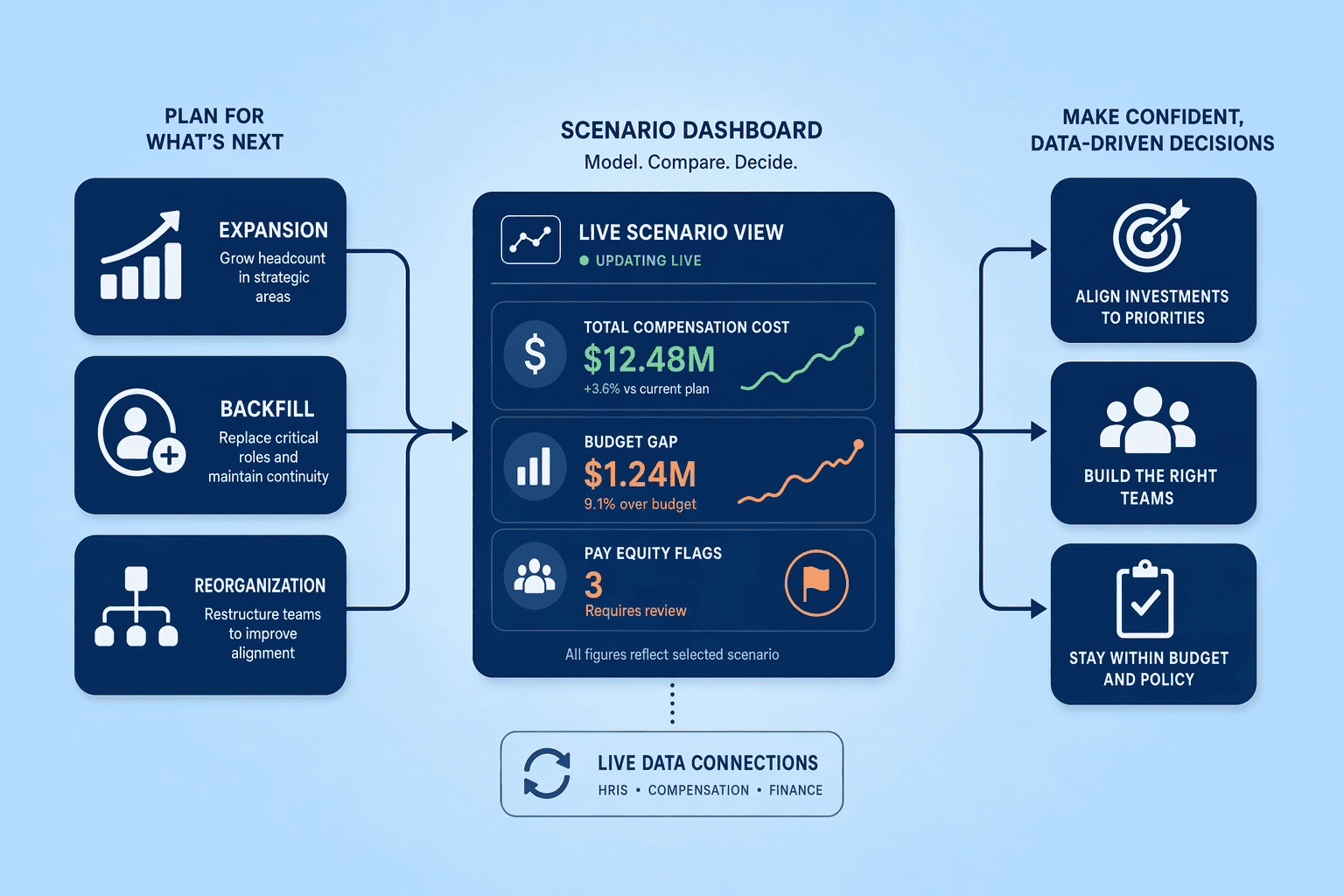
Generic workforce-forecasting tools, Anaplan and Visier are frequently mentioned for scenario planning, provide headcount models and FP&A workflows but lack compensation-specific layers like pay-equity analysis and real-time benchmarking. Centage, an FP&A platform with workforce planning built into the core, can model headcount scenarios and calculate benefits and taxes automatically [F1-2, F1-3, F1-4], yet public documentation does not show integration with live compensation-benchmarking data. Compensation-specific platforms close this gap by embedding market pay data, compa-ratio tracking, and equity guardrails directly into scenario workflows, so every what-if calculation includes salary-band alignment and fairness checks.
A real-world workflow for compensation-scenario modeling follows five steps:
For example, a mid-sized tech company modeled a 20% engineering headcount expansion using unified compensation-workforce data and discovered a $150K annual budget gap due to outdated salary bands. The scenario workflow surfaced the shortfall early enough to adjust bands, reallocate budget, or phase the hiring plan, preventing the overrun that would have occurred under reactive planning.
Effective scenario modeling requires careful implementation planning to avoid disrupting payroll cycles and existing compensation workflows during platform onboarding.
Onboarding timelines vary by platform and organizational readiness. SaaS platforms like CompUp typically deploy in 30-60 days, covering HRIS integration, data validation, and pilot-team training. Enterprise HRIS-native tools, Workday, Oracle, SAP, require 90-120 days due to multi-system dependencies and custom workflow mapping. Custom integrations or on-premise deployments often extend to 120+ days, especially when legacy payroll systems lack modern APIs. Organizations with clean HRIS data and pre-defined compensation workflows reduce onboarding time by 25-30%; those migrating from spreadsheets add 4-6 weeks for data cleanup alone.
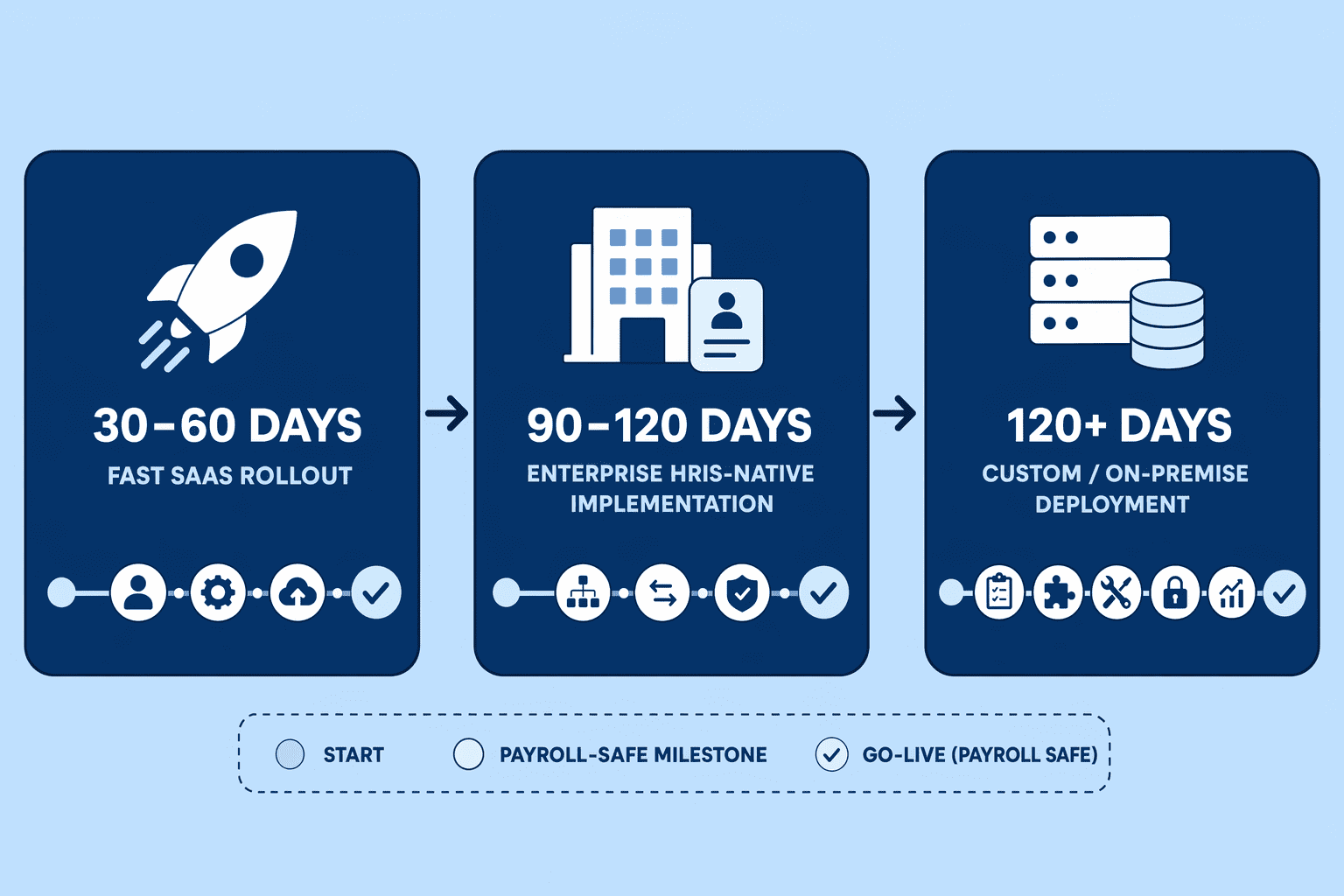
Data migration and payroll-cycle handoff workflows require a 4-phase approach:
Change management for unified compensation-workforce workflows follows a 4-step framework:
What this means: Launching mid-payroll cycle without a data-validation buffer creates reconciliation errors and team distrust in the new system. Schedule deployment around payroll boundaries, run shadow cycles, and validate integration before going live. For more on workforce trends shaping planning tools, see Significant HR Trends.
Also Read: Choosing the Right Workforce Planning Tool: Decision Criteria
With implementation considerations in mind, the final step is applying decision criteria to choose between unified platforms and point-solution architectures based on your organization's needs.
Selecting a workforce planning tool with compensation capabilities requires understanding whether your organization benefits more from best-of-breed point solutions or a unified platform. Point solutions offer flexibility but demand integration overhead; unified platforms like CompUp, Workday, and SAP SuccessFactors eliminate data-reconciliation friction by embedding compensation workflows directly into workforce planning.
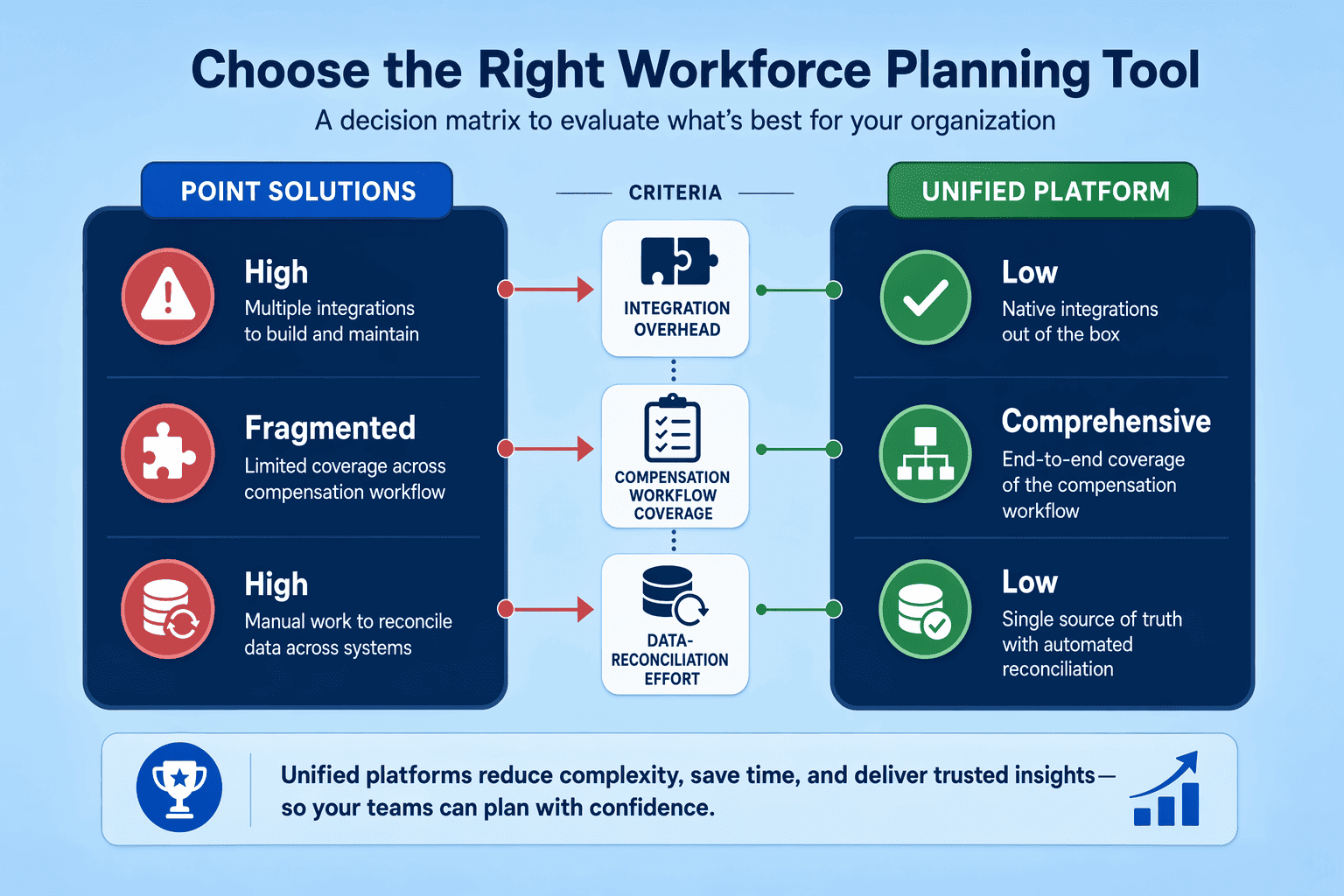
Point solutions excel when teams already maintain established integration infrastructure. For example, pairing Anaplan for workforce forecasting with a standalone compensation tool allows teams to preserve existing workflows. However, this approach introduces reconciliation overhead: compensation data must be exported, transformed, and synced manually between systems. Organizations relying on point solutions typically budget dedicated analyst time to maintain data pipelines and resolve versioning conflicts during annual merit cycles.
Unified platforms integrate workforce planning and compensation management in a single environment, enabling real-time budget simulations and pay-equity audits without manual data handoffs. Workday HCM and SAP SuccessFactors provide enterprise-scale HRIS-native solutions, while CompUp offers scenario modeling tailored for mid-market and enterprise teams. Oracle Cloud HCM delivers similar capabilities but requires sales engagement to scope functionality. The operational benefit: managers model headcount scenarios and instantly see compensation impacts without waiting for cross-system synchronization.
Use this decision framework:
Key Takeaways: Point solutions suit teams with existing integration infrastructure; unified platforms suit teams prioritizing pay-equity automation and workflow efficiency. Compensation planning software is not legally required for pay transparency compliance, laws mandate disclosure, not specific tools, but unified platforms operationalize pay-equity risk reduction at scale.
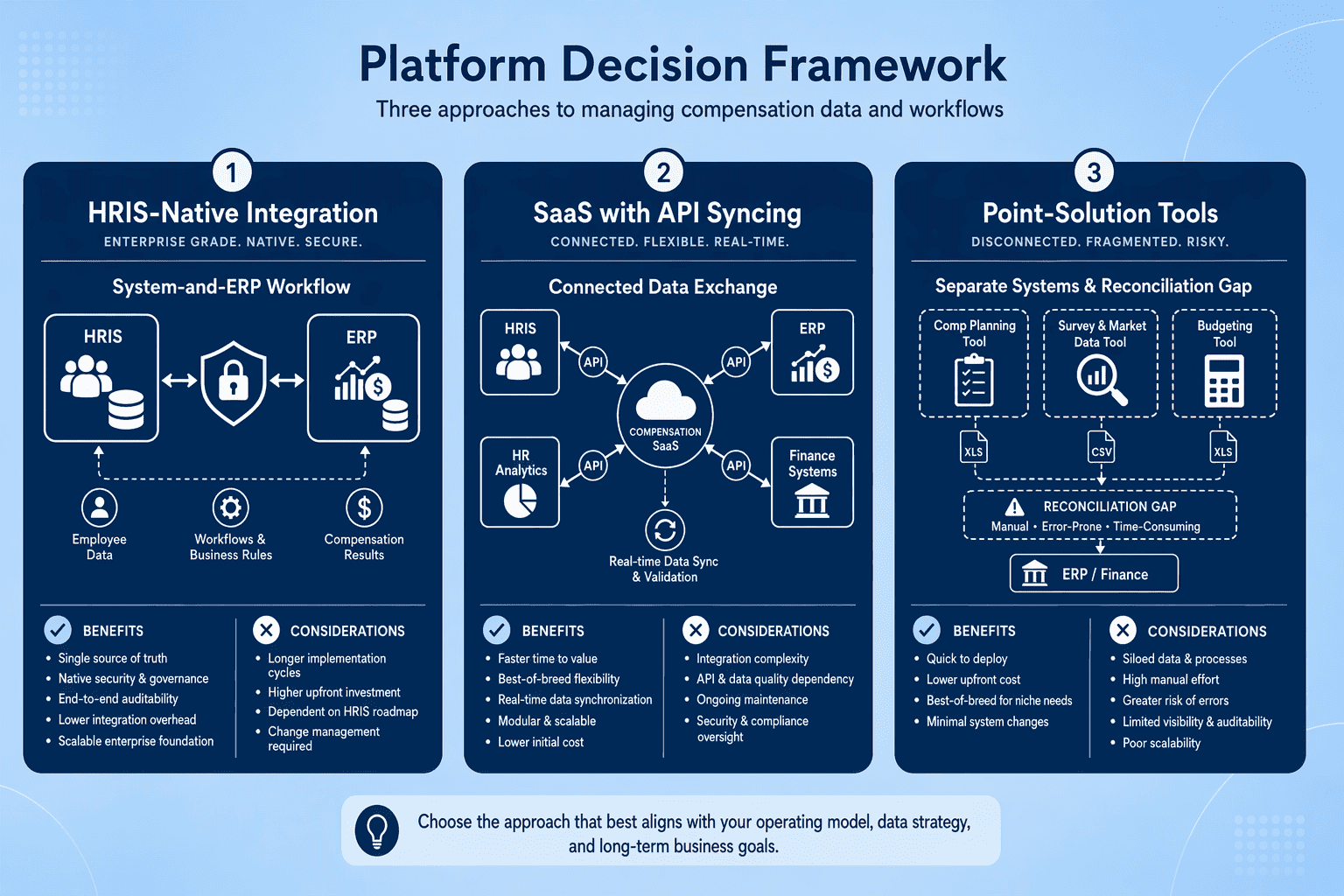
Enterprise HRIS-native platforms like Workday and SAP SuccessFactors offer deep ERP integration but require multi-quarter implementations. SaaS platforms like CompUp deploy faster with API-based HRIS syncing but require buyers to verify integration depth in demos. Point-solution workforce tools plus separate compensation software offer best-of-breed flexibility but create data-reconciliation overhead; unified platforms automate syncing and pay-equity workflows but require HRIS compatibility verification upfront.
As pay transparency laws expand globally, workforce planning tools will increasingly embed real-time compensation benchmarking and automated pay-equity audits as table-stakes features. Organizations looking for a solution that delivers native compensation-workforce integration without the complexity of multi-quarter enterprise implementations should consider CompUp — a platform purpose-built for teams that need real-time pay-equity analysis, bidirectional HRIS syncing, and scenario modeling that connects headcount decisions to compensation impact from day one.
Audit your current workforce-compensation workflows to identify integration gaps, then book a free demo with CompUp to see how unified planning eliminates manual reconciliation, automates pay-equity audits, and gives your team real-time visibility into how every hiring decision impacts your compensation budget.
Workforce planning with compensation planning combines headcount forecasting with real-time benchmarking, pay-equity audits, and budget-impact modeling. This integration shifts workflows from headcount-only scenarios to unified planning that calculates salary band impact, equity cost, and budget utilization as managers model new hires.
Point-solution tools offer flexibility but create data-reconciliation overhead when syncing separate workforce and compensation systems. Unified platforms automate pay-equity workflows and real-time syncing but require upfront verification of HRIS compatibility, particularly whether integrations support bidirectional data flows or only manual exports.
HRIS compatibility determines whether platforms sync workforce and pay data bidirectionally in real time. API-listed integrations don't guarantee real-time flows, native workflow integration embeds compensation logic directly into headcount planning, calculating salary band impact and budget utilization instantly when managers model new hires.
Look for three compensation-specific capabilities: headcount what-if planning with real-time benchmarking, budget-impact modeling for expansion and reorg scenarios, and automated pay-equity gap detection. Generic workforce tools like Anaplan provide headcount models but lack compensation layers like pay-equity analysis and market-rate validation.
Implementation timelines vary by platform and organizational readiness. SaaS platforms typically deploy in 30-60 days covering HRIS integration and training, enterprise HRIS-native tools require 90-120 days, and custom integrations extend beyond 120 days. Scheduling deployment around payroll cycles reduces disruption risk.
Compensation planning software is not legally required for pay transparency compliance, laws mandate disclosure, not specific tools. However, unified workforce-compensation platforms reduce pay-equity risk by automating audits as a byproduct of planning cycles, catching equity gaps before disclosure deadlines.
Platforms handling workforce and pay data should meet ISO 27001, SOC 2, and GDPR compliance baselines. When evaluating unified platforms, request third-party audit reports to verify security certifications, most platforms follow these standards, but verification depth varies across vendors.
Community Manager (Marketing)
As a Community Manager, I’m passionate about fostering collaboration and knowledge sharing among professionals in compensation management and total rewards. I develop engaging content that simplifies complex topics, empowering others to excel and aim to drive collective growth through insight and connection.
Revolutionizing Pay Strategies: Don't Miss Our Latest Blogs on Compensation Benchmarking