
Spreadsheet errors during annual compensation reviews cascade from fragmented data architecture, timeline pressure, and manual tool limitations. When employee records, organizational structure, and compensation data live in separate files, version control issues and field mismatches multiply—forcing HR teams into last-minute reconciliation loops that guarantee mistakes at scale.
Spreadsheet errors during annual compensation reviews stem from three structural causes: fragmented data architecture, timeline pressure, and the mathematical unreliability of manual tools. Each factor compounds the others, turning small oversights into organization-wide discrepancies.
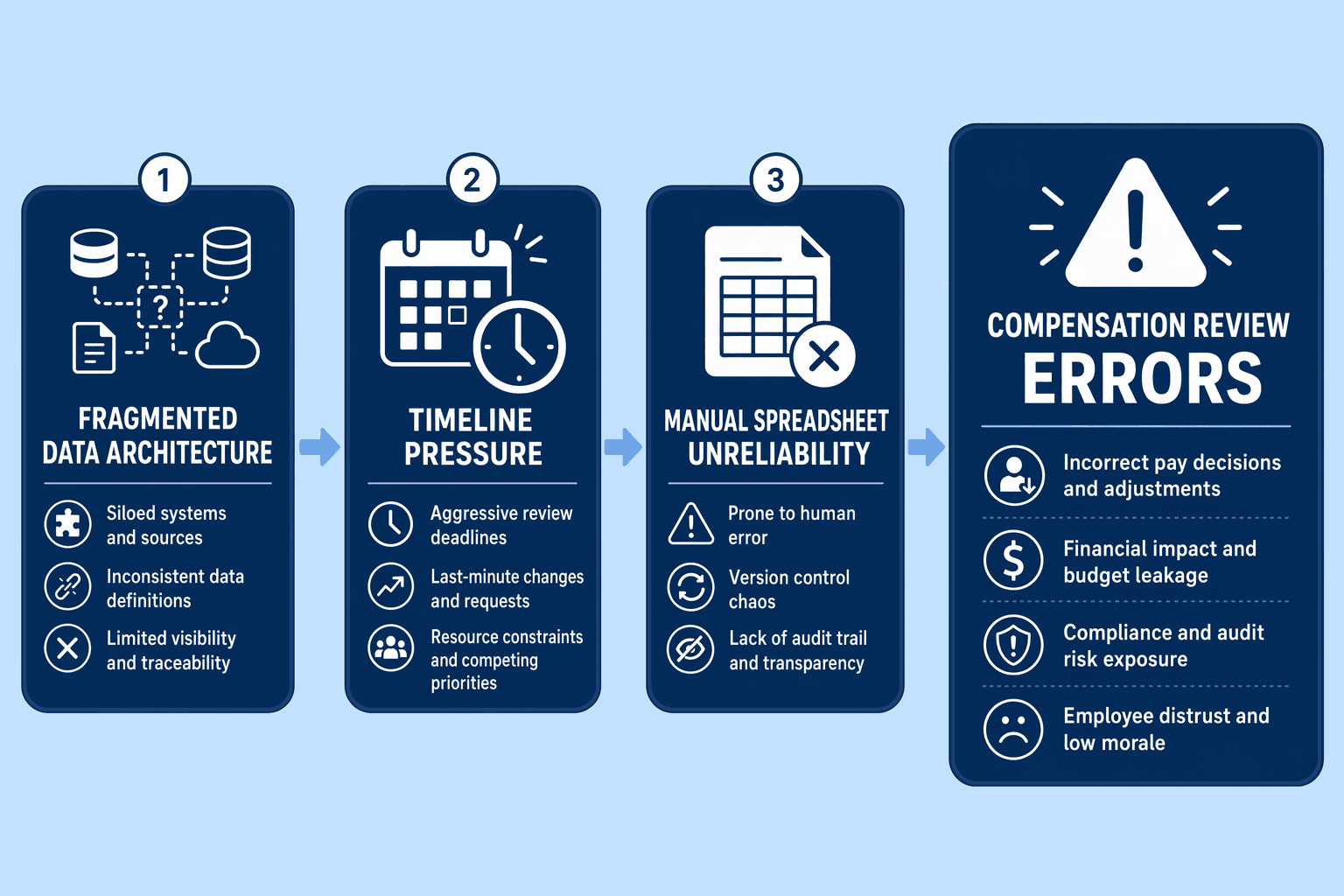
When employee records, organizational structure, and compensation data live in separate spreadsheets, version control issues and field mismatches multiply. One team updates salary bands in a local file while another references last quarter's merit pool in email—by cycle close, no single source reflects current reality. Nearly 90% of spreadsheets contain errors that impact decision-making, making fragmentation the primary error vector.
Annual compensation cycles impose hard deadlines. Manual processes increase administrative workload and cycle timelines, incentivizing teams to skip reconciliation and manual spot-checks. When final approvals are due in 48 hours, HR directors prioritize submission speed over accuracy—propagating formula errors, duplicated rows, and outdated benchmarks into finalized budgets.
Spreadsheets lack built-in guardrails to prevent rounding inconsistencies, decimal-place typos, formula overwrites, and copy-paste errors. Errors lead to mispayments, employee trust risks, and compliance exposure. At scale—managing hundreds of employee records across multiple tabs, manual tools make mathematical accuracy structurally unattainable. Compensation planning software like CompUp offers automated validations that manual spreadsheets cannot replicate.
Understanding why spreadsheet errors happen sets the foundation, now we turn to prevention. The first intervention occurs before the compensation cycle even begins.
Implementation checklists consistently find that 70% of merit cycle errors can be caught via pre-cycle data reconciliation, before they matter. The challenge is fragmentation: employee records live in one system, org charts in another, salary bands in spreadsheets, and market data in static reports. This fragmentation breeds version conflicts, stale benchmarks, and approval chaos.
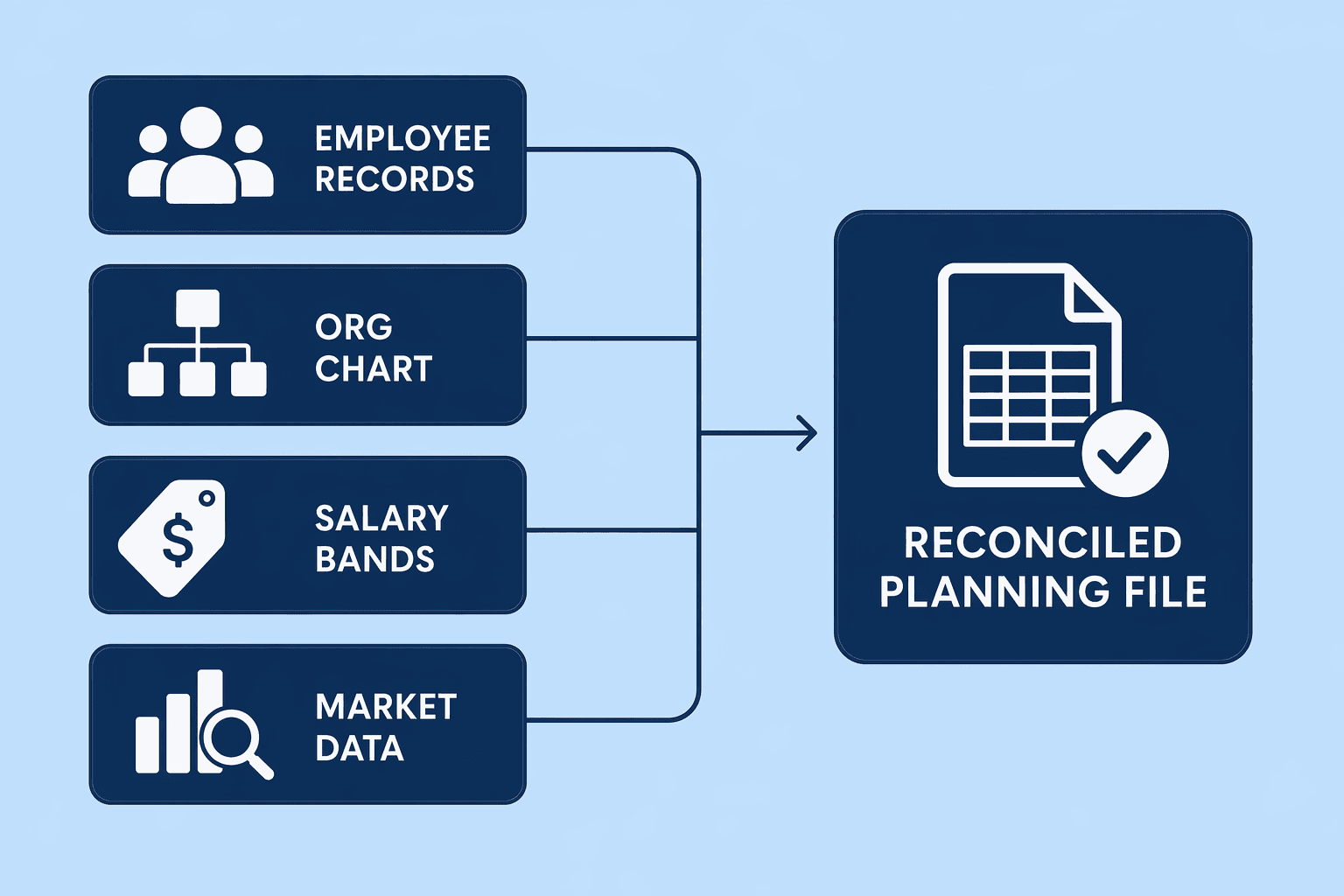
Run this checklist 30 days before cycle kickoff:
Tools that automate salary planning and ensure pay equity simplify this workflow. CompUp's salary banding tool , for example, automatically syncs employee records with structured compensation bands, reducing manual reconciliation overhead.
Salary benchmarks age quickly. A six-month-old market survey can produce compression issues and equity gaps by cycle time. Quarterly scans refresh your baseline, flag high-risk roles, and surface adjustment priorities before managers build their increase budgets. Pre-cycle reconciliation catches stale data; quarterly scans keep it from going stale again.
Suggested Read: Step 2: Implement Automated Validation Rules During Budget Allocation
Pre-cycle data reconciliation catches 70% of errors before they matter. The next step locks in that clean data with automated guardrails during budget allocation.
Manual compensation review processes collapse under error accumulation because spreadsheets lack structured validation. Modern compensation management platforms replace manual spreadsheet processes that are too slow and error-prone by integrating real-time market data, internal HR records, and planning workflows. Key capabilities include automated market pricing, scenario modeling for budget planning, pay equity analytics, and thorough audit trails that support compliance. This section prescribes the validation rule types that eliminate entire error categories during in-cycle budget allocation.
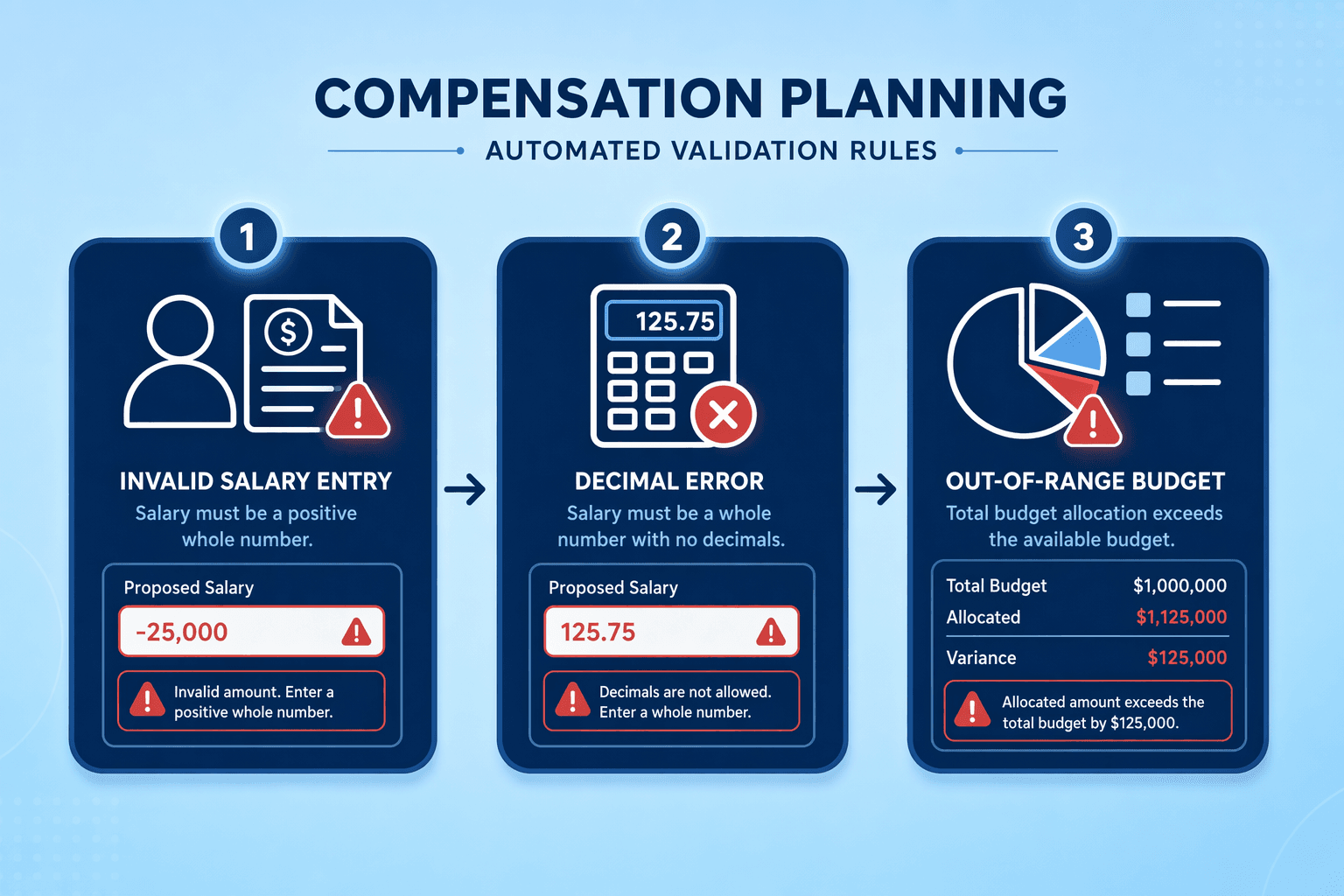
Configure your compensation planning platform to lock formula cells so managers cannot accidentally overwrite calculated fields during merit-cycle allocation. This prevents the error pattern where a manual edit to a total-compensation column breaks the underlying base-salary + bonus + equity formula, amplifying downstream budget variance. CompUp's budget simulation tools enforce this protection by restricting manual edits to designated input fields only.
What this means: enforce a single decimal-place standard across all monetary fields. If your organization rounds salary adjustments to the nearest dollar, configure the platform to reject entries with fractional cents. If equity grants must round to whole shares, build that constraint into the validation layer. AI-driven validation platforms can detect inconsistencies, but predictive models can unintentionally perpetuate existing workplace biases if the underlying data is skewed, treat data quality as a prerequisite for AI-driven checks.
Mandate who/when/why fields for every compensation adjustment to prevent post-cycle discovery amplification. When a manager reallocates $2,000 from one employee's merit pool to another, the system should log the approver ID, timestamp, and justification note before committing the change. Compensation management platforms offer audit trail functionality, approval workflows, and compliance reporting as standard features. CompUp helps study budget utilization during merit planning, surfacing who made each allocation decision and when they made it. This metadata becomes critical when reconciling approved budgets against final allocations during board review or regulatory audit.
Automated validation rules prevent formula overwrites and field mismatches. Real-time budget tracking ensures managers and HR stay aligned as allocations evolve.
Manual spreadsheet refresh loops, HR pulling spend data from payroll, emailing managers for updated allocations, and reconciling version conflicts, burn hours and delay intervention. A live budget dashboard eliminates that cycle by surfacing the metrics that matter: total budget consumed, per-department variance, and compression-risk flags. Mid-size companies especially need these insights surfaced in real time, because tight headcount means a single overspend can cascade across the entire cycle.
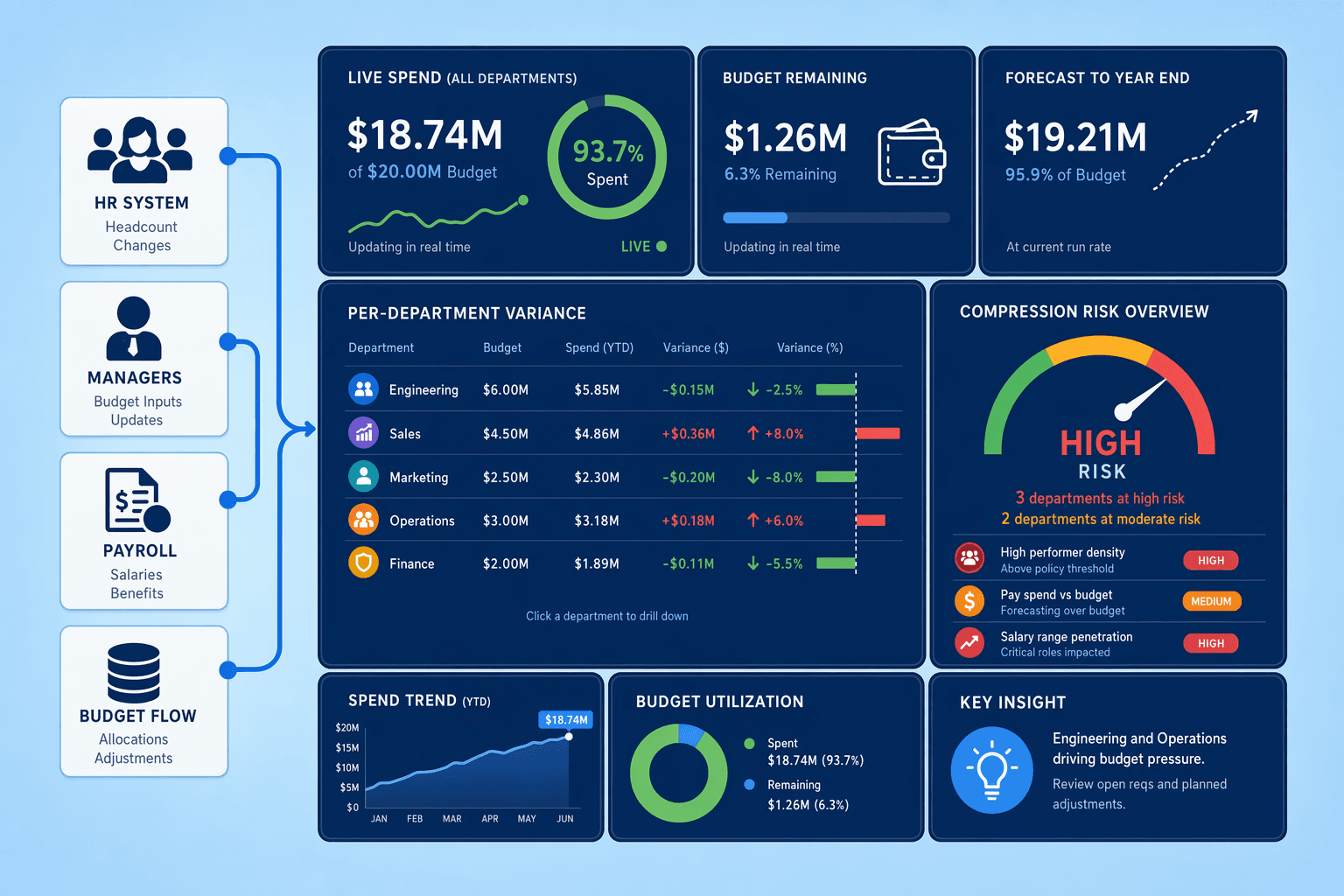
CompUp's Budget Simulation feature gives HR and managers a shared view of budget utilization during merit planning, tracking spend against allocated ceilings and highlighting departments that are trending toward overrun before approvals lock in. When managers see their variance in real time, they can adjust recommendations immediately rather than discovering the overspend after Finance rejects the entire cycle.
Real-time visibility prevents most overruns, but when a manager's recommended increases exceed their allocated budget, a documented escalation process ensures the decision moves to the right approver rather than stalling the entire cycle. Define the workflow in four steps:
CompUp's approval workflows automate steps 1 to 3: the platform flags variance, routes the request to the correct approver based on your configured thresholds, and captures the manager's justification inline. That removes the email-chain limbo that used to add days to cycle completion and ensures Finance sees the same override rationale HR and managers discussed.
Real-time collaboration prevents budget overruns during allocation. Before final approval, one more checkpoint surfaces hidden bias and compliance gaps.
Locking in compensation changes without a final equity and compliance check invites legal exposure and morale damage. This step prescribes the five audits HR teams must run before releasing finalized numbers, every year.
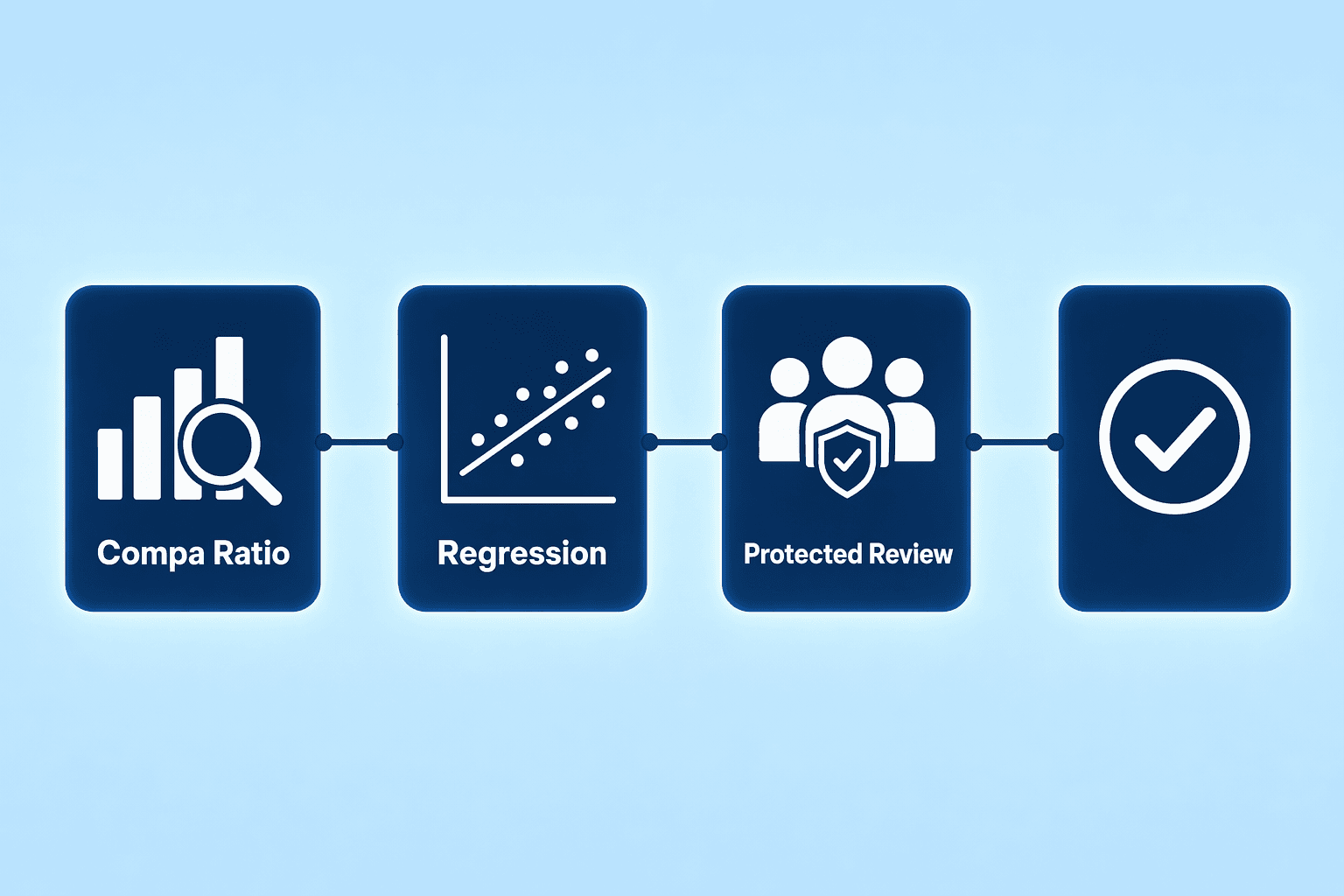
Statistical tests surface compression and hidden bias that spreadsheet scans miss. Begin with compa-ratio analysis across protected groups; employees at identical job levels should cluster within the same narrow band. Next, run regression modeling that controls for legitimate differentiators, location, experience, performance rating, and flags residual gaps that cannot be explained by business factors. Finally, overlay a tenure-based compression review to catch instances where long-serving employees drift below newly hired peers.
CompUp automates these audits, surfacing gender, race, and role disparities within the platform so teams address inequities before they become public.
Regulatory pitfalls cluster around FLSA misclassification, state-specific minimum wage updates, and overtime eligibility thresholds. Before finalization, verify that every role tagged exempt still satisfies the current salary and duties tests; jurisdictions update thresholds mid-year. Cross-check state and local minimum-wage schedules for any employee whose proposed raise lands below the floor. Flag positions where actual hours worked suggest nonexempt status despite the job title. Tools that handle pay equity checks often surface classification risk as a byproduct of their statutory-compliance modules.
Key Takeaways: Pay equity is not a one-time effort and requires continuous monitoring and evaluation. Embed these five audits, compa-ratio, regression, tenure compression, FLSA classification, and wage-floor validation, into your annual cycle so compliance and fairness become structural, not optional.
Pay equity audits catch compression and hidden bias before decisions go live. The final step locks those decisions in place with documented approval workflows.
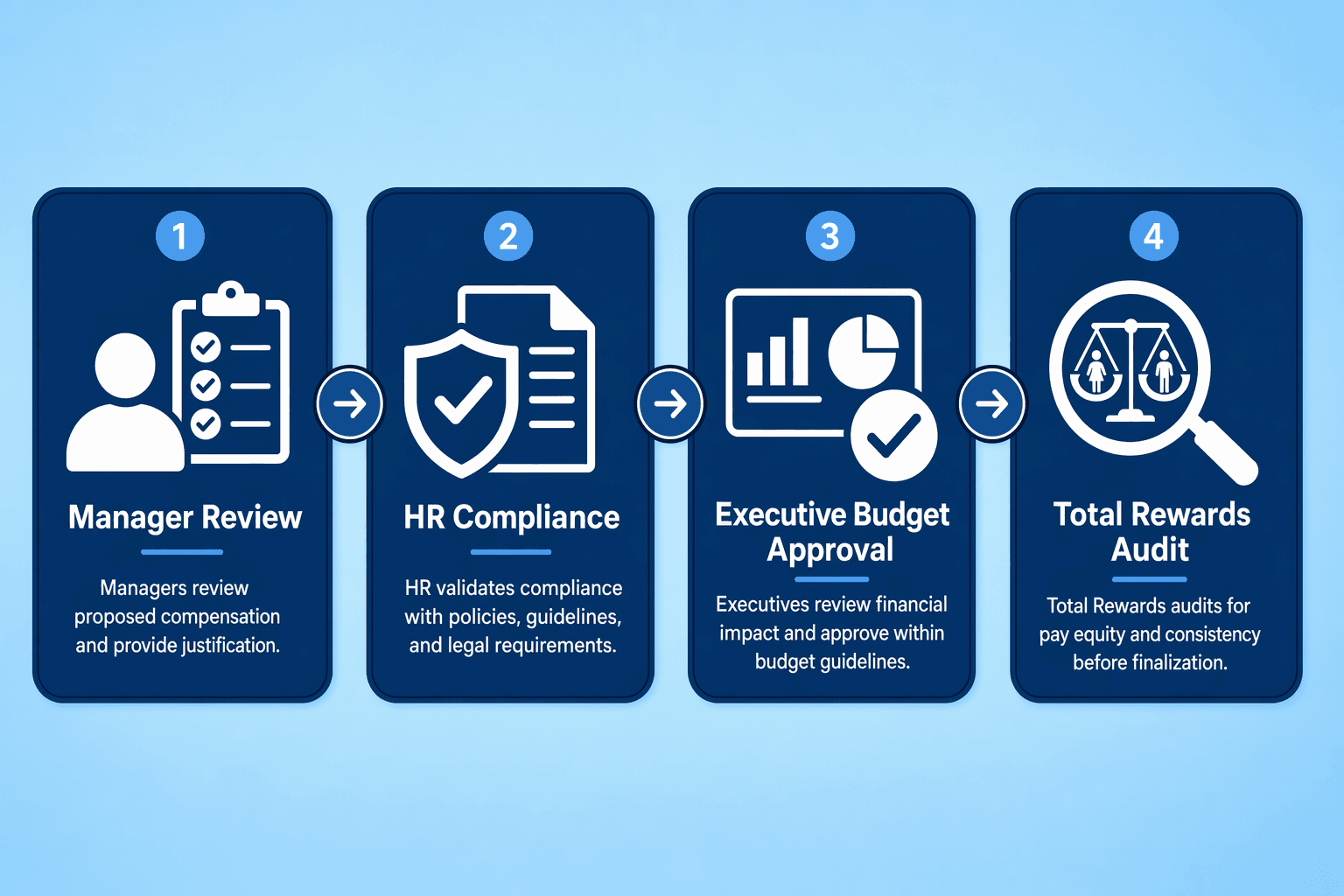
Route compensation decisions through a multi-tier approval process to prevent unauthorized changes and maintain accountability. GitLab's annual compensation review cycle demonstrates this workflow in practice: managers review team member accomplishments and propose adjustments, HR reviews proposals for equity and budget compliance, executives approve aggregate budget impact, and Total Rewards conducts a pay equity audit before final approval. This four-step routing process ensures every compensation change is evaluated for performance alignment, internal equity, and budget constraints before implementation.
Once approvals are complete, freeze the compensation file to prevent post-approval overwrites. Checkbox.ai and similar platforms automate this lockdown step by restricting edit permissions after final sign-off. CompUp's multi-level access control enforces role-based permissions, allowing HR to archive the final compensation state while blocking manager-level edits post-approval. Export a timestamped PDF or CSV of the locked file for audit-trail integrity, this becomes the official record if compliance questions arise later.
Documented approvals and system lockdowns prevent post-cycle overwrites. Compensation planning software automates the entire five-step framework, replacing manual spreadsheet workflows.
Compensation planning software replaces error-prone spreadsheets with structured workflows that eliminate common mistakes. Modern platforms enforce validation rules, provide real-time budget tracking, and document approval workflows, automating the five-step error-prevention framework outlined earlier.
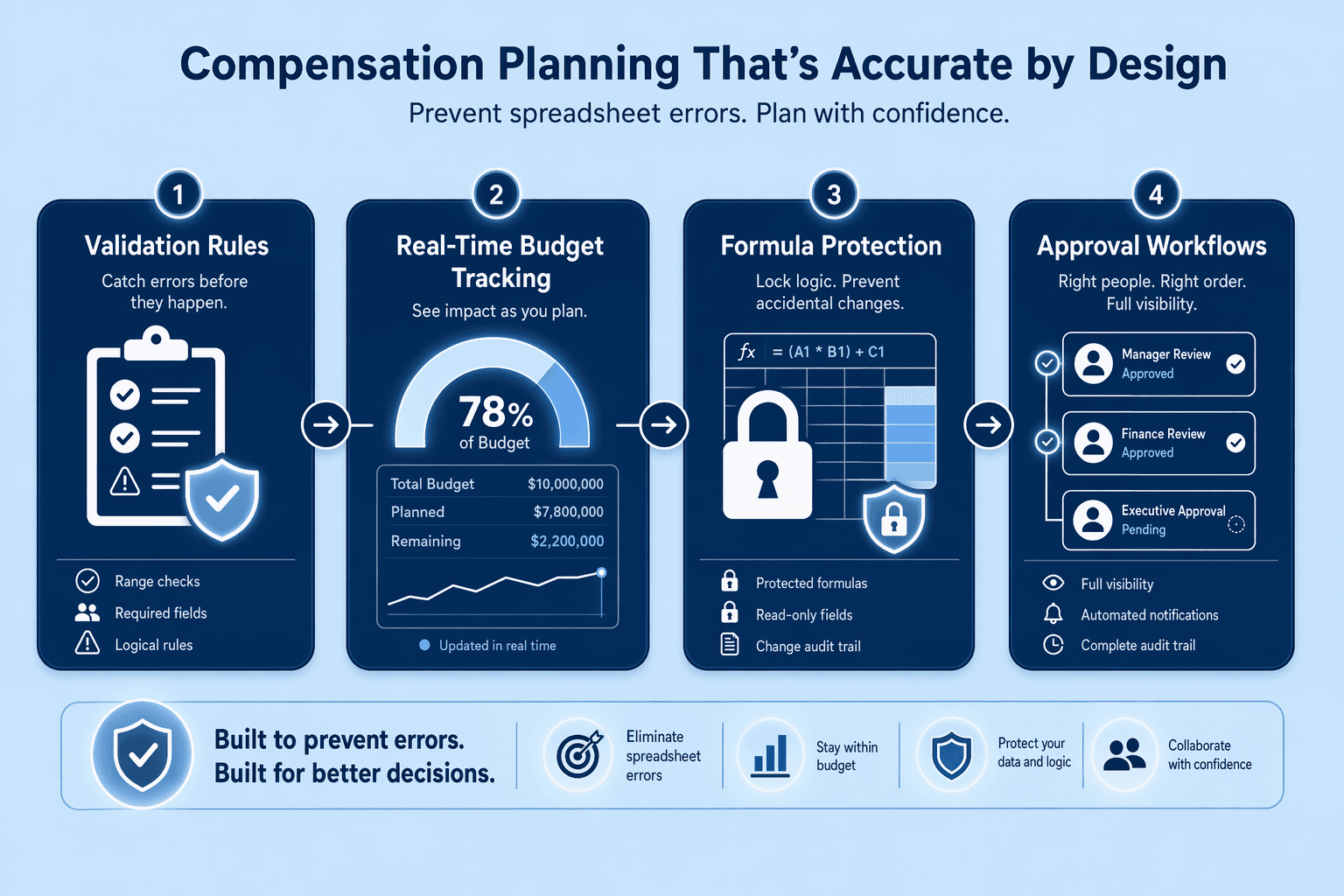
Software-enforced validation rules prevent mathematical and data-entry errors cataloged in Section 1. Platforms standardize decimal precision, protect formulas from accidental edits, and require metadata fields before allowing managers to submit increases. CompUp's budget simulation tools use forecasting to plan reward allocations, catching over-budget scenarios before they reach payroll. Automated checks replace manual formula audits, eliminating entire error classes.
Live dashboards give managers instant visibility into budget consumed, variance alerts, and compression flags, without manual exports and reconciliation. Real-time reporting surfaces budget overruns as they occur, not days later during HR review. Managers adjust increases on the fly, informed by current data rather than stale snapshots.
Automated routing (manager → HR → finance → exec) with change-history tracking eliminates conflicting spreadsheet versions and overwrite risks. Every edit is logged, every approval timestamped. CompUp's approval workflows provide real-time budget simulation and centralized version control, ensuring one source of truth throughout the cycle.
Key Takeaways: Compensation software automates the manual validation, tracking, and approval steps that spreadsheets leave to human discipline, reducing errors by design rather than by vigilance.
Also Read: FAQ: Eliminating Spreadsheet Errors in Compensation Reviews
The four main error categories are mathematical errors (rounding inconsistencies, formula overwrites), data entry mistakes (typos, copy-paste errors, field mismatches), version control issues (conflicting spreadsheet versions, overwrite risks), and overlooked special conditions (bonuses, equity grants, classification changes). When employee records, org structure, and compensation data live in separate spreadsheets, field mismatches multiply.
Run a pre-cycle reconciliation checklist 30 days before kickoff: merge employee records, org structure, and compensation data in a single source; validate salary bands against market data; run quarterly market scans to prevent benchmark drift. This pre-cycle workflow catches 70% of merit cycle errors before timeline pressure forces validation shortcuts.
Automated validation rules eliminate entire error categories, formula overwrites, decimal-place inconsistencies, missing audit trails, but require clean underlying data to work. Pre-cycle data reconciliation (Step 1) is the prerequisite for validation rules (Step 2) to be effective. Predictive models can unintentionally perpetuate existing workplace biases if the underlying data is skewed.
Pay equity audits should align with annual compensation reviews as an ongoing, repeatable cycle, not a one-time checkbox. Embed compa-ratio analysis, regression modeling, tenure compression checks, FLSA classification validation, and wage-floor audits into your quarterly or pre-cycle workflow so compliance and fairness become structural. Pay equity requires continuous monitoring and evaluation.
Manual spreadsheets require manual refresh loops, lack real-time budget tracking, carry formula-overwrite risks, and suffer version-control issues. Compensation planning software automates validation rules, provides live budget dashboards, documents approval workflows, and maintains audit-trail metadata, eliminating the error categories that collapse manual processes at scale.
The five-step workflow (pre-cycle reconciliation, automated validation, real-time tracking, pay equity audits, approval lockdown) can be executed manually, but software automates validation, tracking, and routing steps that manual processes struggle with at scale. Small teams can start with the manual workflow; mid-market and enterprise HR teams benefit from software to manage hundreds of employee records without error propagation.
Define budget-ceiling thresholds (e.g., department exceeds allocated budget by >5%), assign approval routes (manager → HR → finance → exec), document override rationale, and track escalation history. Real-time budget simulation surfaces variance alerts before overages require board intervention, giving decision-makers visibility to course-correct early.
Community Manager (Marketing)
As a Community Manager, I’m passionate about fostering collaboration and knowledge sharing among professionals in compensation management and total rewards. I develop engaging content that simplifies complex topics, empowering others to excel and aim to drive collective growth through insight and connection.
Revolutionizing Pay Strategies: Don't Miss Our Latest Blogs on Compensation Benchmarking